WTF is going on with 32Red's viper client

brianmon

Paleo Meister (means really, really old)
webby
mm4
Joined
May 22, 2013
Location
Cumbria
I've been playing at 32Red for years on this laptop, without any problems. But over the last 6 months or so, it's got more and more power hungry.
As soon as I open the client my CPU usage goes straight up to 100% and the fan kicks in.

My computer became even more sluggish today, and kept saying it had stopped responding. So I checked the resource monitor, only to find the JUST the lobby is running 2 processes one of 35% processor time and the other of 39%. That's 74% of a fairly good dual-core intel processor just to run the lobby, WITHOUT any games or other windows open.

And they wonder why everyone's moving to browser-based multi-platform sites
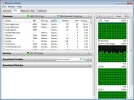
ScreenHunter_126 Jan. 06 11.18.webp
 
You should have 1x Casinohost and 2x Casinogame when you have the casino open and are playing one game. Something is wrong here. It looks like something I have seen frequently, that is the old Casinogame process carries on running after the casino is closed.

What you probably have here is 1x casinogame from the current session, plus an old leftover casinogame from a now closed session. casinohost should also be on that list, but is probably off the bottom as it doesn't use much in the way of CPU.

Another problem is a "stuck" casinopatch.exe process, which will cause the casino to load, launch, then just disappear. Further attempts to launch the casino will just fail.

These are not new problems, they have been around for months, even years. It's just that Microgaming never get around to fixing such things, and in the end the bugs build to the extent that many users suffer major issues as happened last month with the tournaments, where existing bugginess suddenly got worse, and users could no longer work around the problem.
 
Ok Mine runs Casinogame.exe and casinohost.exe
The first uses 77% CPU but im running it on on an and ancient Laptop
The casinohost.exe doesn't use anything really.

I had problems with that damn viper thingy crashing a lot though
I have had a much better time using their Game Arcade (Outdated URL (Invalid)) Try that.
 
Same here same old problem's, Anyone else noticed the free roll 250$ is running really slow and loads ok then cut out and the page just gets stuck:eek2: so keep having to load the game and reload the tournament by the time I get it to load my time up and game finished .Same with Avalon free roll loads ok then freezes very disappointed there still errors with these been ages seen I last posted about the problem's around 4 weeks of errors on and off :mad:


Golden download could not get it to load at all

Agree same issues with viper keep crashing
 
mine doesn't run that slow but crashes at least once every session, without fail! It's annoying and along with other reasons has led to reduced playtime on 32red for me...
 
Still not worked out how to do screenprints to paste on here !! - but my cpu usage with 32red open and a game playing varies between zero and 2 percent !
 
32 red viper component keeps crashing

Hi, I have also noticed a significant increase in problems running the software over the past few Months, I carry out "repair casino" from the file location almost every time I play now and this only adds a temp fix at best. I have also gone through the process of uninstalling all Microgaming software from my computer and then re-installing some from.. 32 Red group and Belle Rock Group. This did result in seeing less of "viper component has stopped working - program will close" with Belle Rock's- Jackpot city etc, but did not help 32 Red group programs with 32 Red & Dash crashing regularly

Please..... Is there any other fix or repair available for this problem, want to keep playing at my favorite site 32 Red????
 
I had a friend who had the same issues. The combination of Antivirus (Norton was the one in her case) along with her spyware protection was causing certain processes to use a much larger amount of system resources anywhere from 275,000 to 500,000 which is way too much to sun smoothly.

The only way to know for sure would be to temporarily exit and close your antivirus program, and compare the commit charge associated with your programs with the antivirus off. Obviously don't go hog wild all around the web with your antivirus off and disabled, but just enough time to test.

I use Avast, and have no issues, although with the new patch of the viper software, there seems to be an extra click required before the login screen will pop up, it kinda stalls til I click anywhere once.

Hope this helps in some way. Makes sense in my mind, but I am not one for explaining technical things, more of a doer.
 
The thing I've noticed is the amount of 'hidden re-installs' the 32red client is doing. I open it up, all my desktop tiles flash (like they do when you install new software sometimes) and I open up a tournament game that I only played 24 hours ago, and 'you can only join when the game has downloaded' black box appears! Then the green bar as the game downloads. WTF?? ALL games were downloaded last time I opened it.>.........<

That's along with the usual shut-down errors if I close all the pop-ups too quickly, or accidentally click anywhere on the screen while a game is opening. :(
 
Then the green bar as the game downloads. WTF?? ALL games were downloaded last time I opened it

Whenever the client updates it has to download EVERYTHING again. It updates enough to launch the lobby at first but its downloading every single game again in the background once you get there :(. Should you try and play something it hasn't got to yet it makes you wait whilst it gets it :(.

I love playing 32red download client (NO ERROR 2!!!!) but it does need a proper refresh, badly.
 
32Red has refused to start on my PC for about the last week. :mad:
Their loss - if I can't log in - I can't deposit!

The intro movie plays and the green bar at the bottom goes NEARLY all the way to the end... then it just "hangs".
I've tried leaving it for literally hours - but nothing happens.
It was working OK about a week ago - and I haven't changed anything on my computer.

Just tried a Casino Rewards casino - and it started up totally normally.

32Red - YOU have a problem!

KK
 
I don't play on 32Red myself since I'm US based. But my buddy in the UK said he got booted out a few times and had to logged back in. Bug issue maybe?
 
32Red has refused to start on my PC for about the last week. :mad:
Their loss - if I can't log in - I can't deposit!

The intro movie plays and the green bar at the bottom goes NEARLY all the way to the end... then it just "hangs".
I've tried leaving it for literally hours - but nothing happens.
It was working OK about a week ago - and I haven't changed anything on my computer.

Just tried a Casino Rewards casino - and it started up totally normally.

32Red - YOU have a problem!

KK

Sometimes important files get corrupted and then the program doesn’t work. If reinstalling doesn’t help, it could be your antivirus blocking it. Try different settings or different antivirus (keep in mind that the antivirus can block it even if it is disabled or closed, only if you completely uninstall the antivirus you can be sure).
 
no deinstall and redownload new clear install will not work ....not for me

support says problem is on my side.....:confused:


and i tried all.....everything you can just do.......ok ok I will not throw my computer out the window :D
 
- if I can't log in - I can't deposit!

32Red - YOU have a problem!

KK

i have similar problems, three weeks ago the system told me i am a new customer and got
some welcome e-mail.

now one week ago i can only log me into Poker/Sports/Casino but NOT to Arcade Flash Casino
and Live Tables (i like to play live sometimes)

so i told 32red support my problem, they could not help me. i have tried to log in different pc/laptop/ Browser and every time i get the same login error:


You do not have permission to view link Log in or register now.
 
32Red has refused to start on my PC for about the last week. :mad:
Their loss - if I can't log in - I can't deposit!

The intro movie plays and the green bar at the bottom goes NEARLY all the way to the end... then it just "hangs".
I've tried leaving it for literally hours - but nothing happens.
It was working OK about a week ago - and I haven't changed anything on my computer.

Just tried a Casino Rewards casino - and it started up totally normally.

32Red - YOU have a problem!

KK

Are you still on Windows XP?
 
Are you still on Windows XP?
No - Windows 8.1
Like I said, up until about a week ago it was working normally (except I can't get any sounds on any game more than 2 years old - another problem 32Red can't fix :()

KK
 
No - Windows 8.1
Like I said, up until about a week ago it was working normally (except I can't get any sounds on any game more than 2 years old - another problem 32Red can't fix :()

KK

when the greenbar complete just click on the game launcher you will get the login window

no need to repair or reinstall just wat for the green bar to load full then click on the launcher
 
when the greenbar complete just click on the game launcher you will get the login window

no need to repair or reinstall just wat for the green bar to load full then click on the launcher
Didn't get that far - started it up just now and it went straight to the log-in screen by itself = back to normal.
Coincidence... or 32Red reading this thread...? :rolleyes:

BTW what is the "game launcher"? Do you just mean the window with "32Red" in the middle?

KK
 
Didn't get that far - started it up just now and it went straight to the log-in screen by itself = back to normal.
Coincidence... or 32Red reading this thread...? :rolleyes:

BTW what is the "game launcher"? Do you just mean the window with "32Red" in the middle?

KK

yes with 32 red in the middle where the startup video plays

for a week it was like to me and when i clicked on it i got the login widow

not playing for 3 days as im bonus banned ......

checked now ... i also got login window normally
 
No - Windows 8.1
Like I said, up until about a week ago it was working normally (except I can't get any sounds on any game more than 2 years old - another problem 32Red can't fix :()

KK
Next time it happens try this...

Do a right click on the .exe and chose "run in compatibility mode".....then let it automatically choose the right version or you can go thru the versions manually until one of them works....then apply those settings
 
Mine sporadicly does the same thing.

I've had about all I can take from 32red at the moment, so I've closed my account for good this time.

The viper client is rubbish (seems to only apply to 32red as CR group runs fine)
LIve chat is not as helpful as it once was
I dont gain anything from the loyalty sytem, after having my account for 4 years
And I dont care what anyone says the games play 100% differently to what they used to play like, it's so hard to hit anything there nowadays.

I guess I should wear my tin foil hat for the last comment, as we all know it random, but ffs, I'm not buying it anymore, so rather than bitch about it I've closed up my account, and won't be re-opening it.
 
Do a right click on the .exe and chose "run in compatibility mode".....
Where do I find this exactly?
I looked in my "Program Files" folder - and there isn't one called "32Red"... :confused:

Cheers,
KK
 
Where do I find this exactly?
I looked in my "Program Files" folder - and there isn't one called "32Red"... :confused:

Cheers,
KK

Usually will be under C:\microgaming\casino

If not there then one way to find out would be when you start the program, instead of starting it with left mouse click do a right mouse and click Properties, then check the target location

Or just search for "casino*.exe
 
Do a right click on the .exe and chose "run in compatibility mode".....
OK, I found the correct folder, as per your latest post.
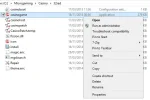
But the application which launches the casino does not show an .exe extension on it, and there is no option for "run in compatability mode" when I right-click.
Is it the "Troubleshoot compatability" option?
(See screenshot)

BTW, was this "fix" just to help me launch the casino, or to (hopefully) cure my lack of sound issue?

Cheers,
KK
 

Attachments

  • 32RedBoot.webp
    32RedBoot.webp
    23 KB · Views: 140
make a link from that file to your desktop ...then right click on the link go to properties ....

then to compatibility .....but on my side thix fix nothing !

it seems that it is dependent weekday ..... I called a friend he lives 2 kilometer away from me he had exactly the same problems!!

on another day all problems seems fixed no problems at all... very strange
 
OK, I found the correct folder, as per your latest post.
But the application which launches the casino does not show an .exe extension on it, and there is no option for "run in compatability mode" when I right-click.
Is it the "Troubleshoot compatability" option?
(See screenshot)

BTW, was this "fix" just to help me launch the casino, or to (hopefully) cure my lack of sound issue?

Cheers,
KK

Yes...that's the one.....and this is only for the case that the casino starts up and then just disappears and doesn't actually show anything or hangs or doesn't load....:thumbsup:

not sure if it would solve the sound bit tho....
 
Yes...that's the one.....and this is only for the case that the casino starts up and then just disappears and doesn't actually show anything or hangs or doesn't load....:thumbsup:

not sure if it would solve the sound bit tho....
No - it didn't cure the sound issue. :(
I tried running in Windows 7 compatibility - but it's just the same.
But on my wife's Windows 7 Advent laptop all the sounds work normally.

Must be some conflict between MG's software and my particular brand of laptop (HP Pavilion).
I have asked 32Red about this - but they couldn't do anything about it.
(I ONLY have this sound issue with download MG casinos - ALL other casinos & software work normally).

Thanks for your help,
KK
 
I thought i'd give my 2 cents as well.

In 18 years of online gaming i never had to uninstall and re-install any MG casino software belonging to the Fortune Lounge, CasinoRewards or Palace Group. Not once!!!

Yet in 3 years playing at 32RED i had to do that probably around 30 times!!! :what: Go figure .... :confused:

I have gotten so far that i always clear cookies, temp files etc. before i start the casino software.

Ended up buying a completely new laptop to see whether that would help.... no change. At the moment the software starts up and the soon i choose a slot i get a small window, saying "Viper component stopped working" and the casino shuts down. After clearing cookies etc. i start the software again and now it works. Really strange and nobody at 32RED can explain it.

Just can't understand why I have these problems only with 32RED casinos, would be nice to have once a proper explanation from one of their IT guys.
 
I thought i'd give my 2 cents as well.

In 18 years of online gaming i never had to uninstall and re-install any MG casino software belonging to the Fortune Lounge, CasinoRewards or Palace Group. Not once!!!

Yet in 3 years playing at 32RED i had to do that probably around 30 times!!! :what: Go figure .... :confused:

I have gotten so far that i always clear cookies, temp files etc. before i start the casino software.

Ended up buying a completely new laptop to see whether that would help.... no change. At the moment the software starts up and the soon i choose a slot i get a small window, saying "Viper component stopped working" and the casino shuts down. After clearing cookies etc. i start the software again and now it works. Really strange and nobody at 32RED can explain it.

Just can't understand why I have these problems only with 32RED casinos, would be nice to have once a proper explanation from one of their IT guys.

Exactly the problem I had.When launching the casino for the first time the 'Viper component has stopped working' message pops up and the casino closes down.Yet this only happens when logging in for the first time in a session,once you relaunch,the casino opens normally.32Red is the only casino to have given me this issue and in the end I just gave up and now play elsewhere.
 
I've noticed after every update the client uses a little more ram, also the games seem to be taking advantage of multi-core processors now, used to run four clients fine on my computer as they all used a single core, now they share all 4 cores so its tends to lag them all out.
 
Nah, it also does it on my Dell laptop. 'Viper client needs to shutdown' messages when you open a tourney game, same if you close all the annoying Dish/no credits pop-ups too fast. Then the ridiculous sound bytes after the casino shuts down. I had the background noise to BDBA playing on an open loop in background yesterday AFTER I shut the casino down, and checked this fact is task manager too. Had to reboot. Then Norton AV seems to randomly prevent 32red from opening, so I have to reinstall whereupon it accepts it afterwards.

I thought it was due to WIN8.1 and the built-in flash and the touchscreen set-up I have, but if it does it on WIN7 then I don't know.
 
Nice surprise. Do you have this crazy stuff also sometimes?

View attachment 53891
next time it happens right click on the task bar bring up the tool bar menu there should be a "start task manager" thing click it and click on performance tab and see if the cpu use is locked on 100%. Theres something that makes this viper client heavy on some computers ive had it lock up many times on old and a fresh bare install . 2 different machines 1 win8 asus vivobook and a win 7 horrid hp its happened on. Mines not like that its just freeze and crash with a windows error thing.My solution was to just play flash casino.
 
Last edited:
KK, I also have a HP Pavilion dv6 Laptop running Windows 7. Do you want me to try and replicate the issue? I havent got 32red installed on this machine yet.
You could give it a go & see what happens. It's not just 32Red though - it's ALL MG download casinos.
I have a Casino Rewards one and Go Wild on my laptop too - exactly the same problem.

On games <2-ish years old the sound works after you move the slider, which always starts on 0.
On older games, nothing I can do make any sounds come out of them. e.g. Ladies Nite, Thunderstruck, Tomb Raider (not even if I hit 5 wilds! :rolleyes:), etc...

I see MG have changed Loaded so that it now opens in a completely separate window with superior graphics and sounds that I CAN hear! So at least that's one of my favourite "oldies" that I can fully enjoy in all it's glory!

PS: I'm still waiting for an answer to my PM at OCR ;)

KK
 

Users who are viewing this thread

Accredited Casinos

Read about our rating system and how it's done.
Back
Top