"How To" Screenshots: fire away!

maxd

Forum & Complaints Team Lead
Staff member
Joined
Jan 20, 2004
Location
Pictland
Hi everyone,

I'm working on a new section for the FAQ wherein I want to detail the wonderful world of screenshots.
  • What applications should one use for screenshots, or not?
  • What caveats and gotchas should players know?
  • Any tricks and tips from the Casinomeister faithful?

So post your "takings screenshots" suggestions here, or questions if you've got 'em.

I expect this will evolve over time so I'll update the questions and answers as need be.

FWIW, I will incorporate Simmo's info posted here: How To Create A Screenshot.
 
Last edited:
Let me chip in with a few of my experiences:

  • some casino packages seem to hijack the PrintScreen button (under Windows) so you can't always count on that technique.
  • a good screen-grab application can be invaluable: I've used
    You do not have permission to view link Log in or register now.
    for years now and swear by it. Not free though, need to buy a license for it ($$).
  • if you're into freebie apps
    You do not have permission to view link Log in or register now.
    is good, though it is not as full-featured as something like SnagIt (nor as bloated!).
 
I use snagit for vids and screen caps, the best part is you can set it up to screen cap and auto name and auto save so you don't even have to bother with going and pasting and saving and naming yourself. You don't necessarily have to buy it per say, just look around, it can be had. Very good program tho'.
 
Windows vista has a built in snip tool. Thats the easiest way to take screenshots as you have full control of which areas you want to take screenshots of. There is also a marker to highlight part of the screenshot.
You do not have permission to view link Log in or register now.


You can choose rectangular screenshots or freeform like this
 
Last edited:
Hiya. Also, a lot of people do not know how to get their screen shot to appear on message boards. I use Photobucket. You go to their site, and the set up is free. They host all your pictures there for free.

At photobucket, you hit upload, and browz, to get the picture off your pc you want to upload. It takes about 5-10 seconds to do. Then, move your cusor over the picture, and boxes appear underneath it. Right click on, "link" and copy. Now come here, and click, "paste" and Weeeeeee.
 
I already know how to do the screen shot. How do I do I post in the forum? Can you please give me advice? I have one ready to post the paint from my desktop.

Thanks
When you post, look below the typing area for a button marked "Manage Attachments".
Click on that & then it is all pretty clear.
You need to make sure your picture is the right size first or strange things can happen!
I have a guide
You do not have permission to view link Log in or register now.
.

I hope it's a good one!
KK
 
KK's thing sounds good. Here's a "once over lightly" guide through the posting process:

Start like you would for any other post, scroll down until you see the "Manage Attachments" button:

Attach Removed (Old not found)

This will open up the 'Manage Attachments" pop-up:

Attach Removed (Old not found)

Repeat steps 1: and 2: for each attachment you want to display (note that there are file dimension and size limits). When you're done click on "Close this window" (step 3).
 
Another thing worth mentioning - if you just hit Print Screen you print your entire screen, including your destop and other windows that may be active at the same time.

If you hold down the ALT key and then hit the Print Screen, it only captures the top 'active' window. So if you're playing at a casino and ALT+PrintScreen you get only the casino - if you're playing at a casino and get an error message window and use ALT+PrintScreen you get just the error message.

:thumbsup:
 
I´m having trouble managing attachments due to lack of space (so it seems anyway). I have checked my profile and deleted old attachments from there and when I go into "Manage attachments" it says "0 of 97,7KB used". That´s too small to attach even one JPEG-file. I can see some of my old attachments lined up in this area but when I select them all there are no "Delete"-button. What can I do?
 
I´m having trouble managing attachments due to lack of space (so it seems anyway). I have checked my profile and deleted old attachments from there and when I go into "Manage attachments" it says "0 of 97,7KB used". That´s too small to attach even one JPEG-file. I can see some of my old attachments lined up in this area but when I select them all there are no "Delete"-button. What can I do?


Well im having the same problem,cant find any delete button when i try to manage my old uploaded files.

Slotaholic
 
It would really be a shame, if people start deleting screenshots from the screenie section. We'd get a long list of nothing in there. Better cough up some more space CM ;)

I think people are running into this problem only when they are still classified as Newbie Members as they have very limited space available. When you're classified as Full Member or up the problems with space are over as the limitations disappear :thumbsup:
 
testing

t.webp
 
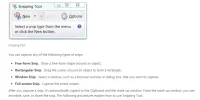
for anyone using win7 there's plenty of good stuff built in now, if you want a quick and easy tool of course you can use the print screen button, along with that there is also a small program called snipping tool that's able to screen shot a specific area which you can drag and drop out across the screen, saving you the trouble of editing the shot later on, useful for removing parts of the screen you dont want to share.

The program is normally in the Accessories folder,

you can read more about the various "snips" available here
You do not have permission to view link Log in or register now.
 
Firefox has advanced quite a bit from the days when I first posted this thread. If in-browser snaps are good enough for you then Nimbus Screenshot (
You do not have permission to view link Log in or register now.
) has served me fairly well recently. It drops your screenshot (visible part of the page, all of the page, selectable region, etc) into a basic paint-style editor for mark-up and then saves to their own "cloud" storage or locally, as the user prefers. Being a browser plugin it has its quirks but overall it's pretty respectable.

On Linux I've been using Hotshots which seems fairly full-featured and robust. It ain't Snagit -- nothing is really -- but it gets the job done. It is Qt-based so it's dead easy to install from the Software Manager if you are using either KDE or LXQt (aka Razor-QT) desktop managers. Not sure how well it performs in a GTK+ desktop manager -- Gnome, Mate, Xfce, LXDE, etc -- but knowing Linux I'd say you're probably fine as long as you don't mind the install process adding a little Qt bloat to your GTK+ environment. As I recall Enlightenment has it's own screenshot tool. I'll hazard a guess and say you're probably best sticking with that, whatever it is. In my experience -- admittedly a couple years old now -- E's stability can easily be compromised by adding Qt and GTK+ apps.
 
Hi all can anyone help I would like to post a screenshot but I don't no how to can you please help thanks all.
Quick version:
Hold ALT GR and press PRNT SC.
Open paint & press CTRL+V
Resize to 680 x 480 pixels
Save as a JPEG (VERY important!)

Long version (including step-by-step instructions, screenshots and how to upload to CasinoMeister):
You do not have permission to view link Log in or register now.


Hope you've got something great to show us! :thumbsup:

KK
 
easier way if you have win 7 or 8.

open up the 'Snipping tool' just search it from the start button and drag the cursor around what you want to screenshot then just do 'File_save as' and it will save as a jpeg and should be the right size to post.

in the post just click on the add image button, hover over the tools and it will say which one to use.
 
easier way if you have win 7 or 8.

open up the 'Snipping tool' just search it from the start button and drag the cursor around what you want to screenshot then just do 'File_save as' and it will save as a jpeg and should be the right size to post.

in the post just click on the add image button, hover over the tools and it will say which one to use.

Can you please tell me in Swedish what a 'Snipping tool' is?
English is fine too :)
Maybe you can take a screenie of it and show me :D
 
Can you please tell me in Swedish what a 'Snipping tool' is?
English is fine too :)
Maybe you can take a screenie of it and show me :D

Hi Tirilej,

To capture a snip


Open Snipping Tool by clicking the Start button Picture of the Start button. In the search box, type Snipping Tool, and then, in the list of results, click Snipping Tool.

Click the arrow next to the New button, select Free-form Snip, Rectangular Snip, Window Snip, or Full-screen Snip from the list, and then select the area of your screen that you want to capture.

Snipping tool.webp

It is very easy to use so when you play with it you will get an idea how this work.

Hope this helps.

Kind Regards,
Karolina
 
That won't help much since I need the Swedish word for Snipping tool :D

I'll try and google for it. Thanks for trying Karolina :thumbsup:

Edit: Found it. Skärmklippverktyget is the Swedish name. Now lets see if I can find it.
 
That won't help much since I need the Swedish word for Snipping tool :D

I'll try and google for it. Thanks for trying Karolina :thumbsup:

Edit: Found it. Skärmklippverktyget is the Swedish name. Now lets see if I can find it.


Skärmklippverktyget ??? WOW ...

I'm sure you will find it as long as you on windows 7 or 8 it should be under start menu.

Good luck and have fun exploring!

Regards,
Karolina
 
Skärmklippverktyget ??? WOW ...

I'm sure you will find it as long as you on windows 7 or 8 it should be under start menu.

Good luck and have fun exploring!

Regards,
Karolina

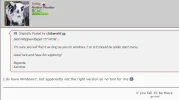
I do have Windows7, but apparently not the right version so no tool for me :(

Edit: That was a lie. I found it :)
 

Attachments

  • Skärmklipp.webp
    Skärmklipp.webp
    21.2 KB · Views: 333
This thread seems like a natural continuation of the one in Screenshots-O-Rama. I trust no one will be overly inconvenienced if I merge the two.
 
I am saving as jpeg.Is that wrong.
JPEG is correct.
Sounds like your problem could be the "huge white border" one.
If using Paint always look carefully to ensure the area outside of your actual shot is light-grey, not white.
If it's white, then this is part of your picture and will consume extra memory space when you save it, and it will be too big to upload.
My guide explains how to avoid this. It's very simple once you know to look out for this problem. :thumbsup:

KK
 
I really have no idea what i am doing wrong.
Even when i shrink my screenshots to a minute size they are saying they are too large when i upload them so i cannot seem to post them today.

Have you perhaps met your attachment allocation (ie you've maxed out the space you're allowed here in CM to post screenies/images)? Check under your settings, look to the left, scroll down, miscellaneous/attachments. Click this, you'll see a green/red bar up top. If you've maxed out your allocation, delete a few older ones to free up some space. This might be why you can't up any more images. Gl.
 
Post more JPEGS

Hello All,

How can I post more pictures?
My profile says I have nearly use 750MB

I have only posted 10 pics APPROX and are around 100 KB each

I have seen post alot more Pictures that are the same size/quality.

Thanks in advance

Al
 
I Gambled 24€ On Slots And It Went Well> Newly Started Youtuber :D All Sub Support And View Support Is Appreciated. Will Upload Big Wins Daily!


Watch my win here:

this is a how to thread .
there are threads specifically geared toward winning screenshots and winner videos
 

Users who are viewing this thread

Accredited Casinos

Read about our rating system and how it's done.
Back
Top