Time for a new PC!

Joined
May 13, 2014
Location
Wolverhampton
Hi All

Regular suffering viewers of my Winners Videos (and videos that suck) will know I've been 'up against it' with the equipment I have.

I am now in a position with work picking up slightly and a few back to back withdrawals to do something about it!

Now I'm not looking to spend a fortune as slotting and the associated videos is a 'take or leave it' scenario.

Before jumping on e-bay, Amazon etc I thought I'd try asking around first, see if anyone has a old one or maybe it is someones job/profession to build bespoke PC's

I am far from totally 'clued up' in this field but I think this is what I roughly need

* Min 8GB Ram
* Quad core processor
* Large (whatever that means lol) Hard Drive
* A fan that isn't constantly on!

Basically so I can have a download client running effortlessly and other windows open (Bandicam etc)

If anyone can help me out/point me in the right direction I would be most grateful.

My budget etc can be discussed in this thread or PM whichever you prefer.

Ideally UK if we can 'do a deal' to avoid excessive shipping costs etc but open to all ideas please

Many thanks

Jon
 
you can get a decent prebuilt custom pc from places such as overclockers with budgets to cater for most price ranges,

in terms of things you will want,

get an SSD drive for all the stuff you use primarily its the 1 thing i wouldnt go without now on a pc, and get a semi decent graphics card nothing too extreme but if you are going to be doing rendering videos and such a dedicated graphics card rather than an onboard one would be my preference (nothing too extreme needed for slots but its makes everything run smoothly).

I've built my pcs since i was 20, nowadays they are "almost plug and play", i know a lot of people shy away from doing it but its very easy and theres tonnes of resources to help you online.

for my recording im using the nvidia shadowplay (or share as its now called) which is built into the gfx drivers, so i can record constantly in the background a set amount of time period then just alt+f10 to save it. There is a min requirment on the gfx card though .
 
I'd simply go SSD full stop. Dearer, but you'll be astonished at the boot speed and smooth running of high-demand programs. eBay has a few PC builders who'll do it to your spec, I got a good one there (desktop) for £300 a couple of years back. Get WIN 10 too, far better than all since Vista.
 
I agree with everything Wild Reels has suggested. My only additions to his comments would be:
.
  • don't over-estimate your CPU needs. Quad-core is a good idea but you'd be surprised how seldom those extra cores are actually used (I know, I've spent hours looking at CPU utilization logs). So if we're talking Intel then an i5 will likely be what you want as opposed to the pricier i7s. That said an i7 will have hyper-threading and that will contribute nicely to your video processing needs. But again, don't buy processing power you don't need: more often than not it's just wasted money.
    .
  • as hard as it may be stop thinking hard drive (HDD) as your main storage and start thinking SSD. Even the budget model SSDs are _miles_ ahead of the old platter HDDs drives in terms of speed and reliability and are very reasonably priced. These days the only justification for buying a HDD is if you have huge storage requirements, say 4TB+. You can get a totally good system with a 500GB SSD as the primary storage for a reasonable price. You'll never go back: think boot and shutdown times in seconds and you'll begin to understand what a revolution the SSD has been for the home PC.
    .
  • DIY is easy these days but there's no need to go there unless you want the "challenge" and the pure fun of doing it. Personally I love it but it's not for everyone. Quality places like Overclockers are barely covering labour costs when it comes to their pricing so you're not saving any coin going the DIY route.
    .
  • Memory is cheap these days so I'd strongly suggest looking at 16GB instead of 8. Sure, in average daily use you won't need that extra 8GB but (a) it's only going to cost you a few bucks and (b) many applications can be tweaked to make good use of it (Windo$, video and audio processing, photoshop, games, etc). Trust me, there's no point in cheaping out here.
    .
  • If you're thinking Intel then ask yourself whether you want tried, true and cheap or kick-ass and "rocket into the future": if the former then get a LGA1150 chipset motherboard (eg Z97), if the latter then look at LGA1151 (eg Z170). A Joe Average sytem in Z97 will be (very) roughly £100-200 cheaper than Z170. On the other hand a properly spec'd Z170 system will give you much more flexibility in terms of SSD storage options, high-speed USB 3.1, and graphics card options (if you ever want to run parallel cards for instance). Save a little and get a conservative but totally good system or splash out a bit and get a faster, more flexible and (IMO) much more "future friendly" system. Your call but neither one is a bad choice so don't sweat it too much.
    .
  • it terms of "quiet" there are basically three options: quiet enough, very quiet and "not a peep" quiet. The first option depends on lots of air flow to keep everything nicely cool but you do end up with a larger-than-average case with the need to think carefully about air flow, fan and CPU cooler choices. This is the route I went and it's been fine but it has required some tweaking and occasionally it does kick up into "wow! there are fans in there!" volume. The second route means choosing a noise-dampened case and the appropriate limited choice and extra expense that incurs. Not a bad way to go by any means but you probably won't end up with a particularly compact system, if that matters to you. The third and final route is fanless, using heat sinks to cool your system instead of fans. Totally viable for an "average needs" desktop PC but you do need to choose whether you want a compact, fairly non-tweakable system or a larger, more expensive, specially designed heavy gauge aluminum case that will leave you room for future hardware swapping but also limit your choice of placement (they have big heat-dissipation fins that need to be somewhere where there is decent air flow). If you imagine yourself needing a fairly decent graphics card -- gaming, harder core graphics and video processing, etc -- then you can pretty much forget the fanless route since most (but not all) graphics cards have built-in fans anyway. Again, I know this from experience: the fans on my graphics card are the only fans I ever hear these days and that only happens when I'm playing games or running fancy graphics-intensive tests or applications.

For an average, pre-built desktop with no special requirements you can get a totally decent system for £400-500 or less. Step up to £750 and you can buy some sweet goodies -- go fanless maybe, or get a real nice graphics card, or get some real speed with a premium SSD solution. At £1000 you're looking at pretty state of the art stuff -- maybe not top drawer system-wide but serious muscle and features. At £1500 you can start choosing top gear for most things and sail happily into PC dreamland.

Enjoy! I love a new box and no matter which way you go you can be a happy camper at the end of it. :D

PS. All of the above assumes that you are pretty much going to go with stock gear running at stock settings and not (necessarily) going to get into overclocking and custom cooling, etc. I know nothing about that world and personally have little interest in going there, so far. ;)
 
Last edited:
Wow, thank you all some great contributions and much appreciated advice, especially as I now realise I know even less than I first thought!

My first down fall is that PC's are not as cheap as I first thought.

The system I have now is 3GB, dual core, 160GB HDD Win 7 which I paid £100 for a couple of years back or so.

My budget (which I should have put in OP, apologies) is a lot lower than suggestions made will cater for and I'd come to expect way too much for peanuts.

My main uses for the PC will be simple office based apps (work from home but not a heavy work load)

Secondary will be basic casino play on accredited flash based sites as well as the 32 Red download client but with the ability to have Bandicam open also and maybe an Excel spread sheet or MS Word Document. (This is impossible at the moment and even 2-3 windows being open causes excessive fan action)

I apologise for not providing more detail in my OP but with limited knowledge until others help out I'm pretty darn in the dark!

I would be looking to spend £150 - £200 max so If I'm not going to get much better for that amount than I am already working with then at least your valuable input has opened my eyes to that fact.

Max suggesting memory being cheap and having 16GB rather than 8GB is a definate 'must have' moving forward though.

Thank you all thus far!
 
Yup, the £200 budget does present a serious challenge and it will be the primary factor determining what you'll end up with.

If I were you I'd either look at a closed-box mini PC -- something like the Intel NUCs -- or a recycled box from a computer shop. Companies often sell off their old gear and they can be picked up for peanuts. Either way though you are just getting something that'll run and hopefully handle your needs for today. Forget about the future, this system is just going to get you through the next year or so in "good enough" mode.

Running Linux can help you here if that is an option, generally Linux has considerably lower hardware requirements than an equivalent Windo$ system. I got an extra two years out of a ten year old box going this route.
 
Wow, thank you all some great contributions and much appreciated advice, especially as I now realise I know even less than I first thought!

My first down fall is that PC's are not as cheap as I first thought.

The system I have now is 3GB, dual core, 160GB HDD Win 7 which I paid £100 for a couple of years back or so.

My budget (which I should have put in OP, apologies) is a lot lower than suggestions made will cater for and I'd come to expect way too much for peanuts.

My main uses for the PC will be simple office based apps (work from home but not a heavy work load)

Secondary will be basic casino play on accredited flash based sites as well as the 32 Red download client but with the ability to have Bandicam open also and maybe an Excel spread sheet or MS Word Document. (This is impossible at the moment and even 2-3 windows being open causes excessive fan action)

I apologise for not providing more detail in my OP but with limited knowledge until others help out I'm pretty darn in the dark!

I would be looking to spend £150 - £200 max so If I'm not going to get much better for that amount than I am already working with then at least your valuable input has opened my eyes to that fact.

Max suggesting memory being cheap and having 16GB rather than 8GB is a definate 'must have' moving forward though.

Thank you all thus far!

OK, that may get you the SSD.
Then you'll run out of money and indeed will be 'fanless' but not in the way Max meant...:D
 
£150-£200 is a pretty slim budget tbh, im assuming you dont mean laptop and that you already have a monitor? with that budget you will be looking for a web browsing machine imo and alot of that budget will be spent on the operating system itself! unless you have a version of windows already or are willing to go full Hooks Heros (pirate)

If your willing to just upgade £200 can go along way

SSD £58
You do not have permission to view link Log in or register now.

Ram price will vary and depend on your motherboad max allowed and speed
GPU From £20-£1000

and the above depends on how outdated your system is!

My thoughts are buy once every 2-4 years and think about the amount use it gets!! I bet u didnt post this on your phone or TV? which probably cost alot more than ur PC budget.
 
My phone and TV are more embarrassing than my PC (although I have replaced TV today)

As Max and others have suggested I am now a lot more realistic and willing to 'make do'

Ideally a system (desktop not laptop) which will last a couple of years maybe with say a 50% improved performance.

Storage space is not really an issue as less than half of my current HDD in being used atm.

I am also not looking to join Dunover's or CK's league when it comes to uploads / videos quality, just a improvement where viewers don't have to suffer awful lag when watching 90% of my vids.

I do plan longer videos but won't purchase Bandicam licence to allow for this until PC is replaced, lets face it 10 minutes of 'drag' is bad enough!

I kind of fooled myself thinking 'If I got this set up for £100 2 years back, I should be ok' - happy to be proven wrong as this was the information I was seeking (ty again!) before taking the plunge in any direction.

This from Max

or a recycled box from a computer shop. Companies often sell off their old gear and they can be picked up for peanuts. Either way though you are just getting something that'll run and hopefully handle your needs for today. Forget about the future, this system is just going to get you through the next year or so in "good enough" mode.

or this from CK

If your willing to just upgade £200 can go along way

SSD £58
You do not have permission to view link Log in or register now.

Ram price will vary and depend on your motherboad max allowed and speed
GPU From £20-£1000


Seem the 2 most likely and realistic options at present

@CK, yes have monitior which is fine, wouldn't risk 'Del Boy' OS tho!


@Dunover, I have always been that kind of 'fan less' and wouldn't know any other way :o
 
If upgrading your current box is an option then I'd seriously look at migrating your OS and main apps onto an SSD and maybe bumping up your RAM. Done right that would come in at well less than £150 and your hands-on speeds should increase noticeably. Keep in mind though that all you're doing here is putting a little jump-juice in the tank, you're not actually rebuilding your system with better, faster guts.

A modest graphics card could well help too but that'll depend somewhat on how old your current system is. If it's an ancient processor then it may not be able to utilize the GPU efficiently. If you knew your current CPU and motherboard that would tell you quick enough whether a cheap, current GPU is a viable option.

The SSD will (should) easily migrate onto a new, future system. The memory may be junk when you (eventually) ditch your current box. The cheap GPU may not be worth hanging onto, depending on what you're able to get and want in your future box.

If you're on Windo$ look into RAM-disk options -- assuming you bought that extra memory -- which can help an old processor get a good bit of it's daily business done a whole lot faster. Yes, it has its caveats and it's not a cure-all but I've done it in the past and it ain't rocket science. It may well help make life a little easier for the next 6 months or so.

Others have said it but it's worth repeating: an SSD is the single biggest bang you can get for your buck these days in a desktop PC. Trust me: it's a bit of future wonderful for cheap.
 
If upgrading your current box is an option then I'd seriously look at migrating your OS and main apps onto an SSD and maybe bumping up your RAM. Done right that would come in at well less than £150 and your hands-on speeds should increase noticeably. Keep in mind though that all you're doing here is putting a little jump-juice in the tank, you're not actually rebuilding your system with better, faster guts.

A modest graphics card could well help too but that'll depend somewhat on how old your current system is. If it's an ancient processor then it may not be able to utilize the GPU efficiently. If you knew your current CPU and motherboard that would tell you quick enough whether a cheap, current GPU is a viable option.

The SSD will (should) easily migrate onto a new, future system. The memory may be junk when you (eventually) ditch your current box. The cheap GPU may not be worth hanging onto, depending on what you're able to get and want in your future box.

If you're on Windo$ look into RAM-disk options -- assuming you bought that extra memory -- which can help an old processor get a good bit of it's daily business done a whole lot faster. Yes, it has its caveats and it's not a cure-all but I've done it in the past and it ain't rocket science. It may well help make life a little easier for the next 6 months or so.

Others have said it but it's worth repeating: an SSD is the single biggest bang you can get for your buck these days in a desktop PC. Trust me: it's a bit of future wonderful for cheap.

Cheers Max

Looks like this is the most viable and likely option at present, problem is the 'how to do' which hopefully will be a case of a bit of Google and plug and play type scenario??

I also plan to firstly follow up your earlier advice of cheap(er) recon/second hand units but will tread carefully on this idea as I've been 'bitten' in the past.

More than realised now it will be a case of the 'Jump Juice' or 'Temporary fix' rather than the all singing & dancing option I'd initially set my sites on and look at the long term solution when financially in a better position.

Existing System details..

Screenshot 2016-01-04 19.55.13.webp
 
Hi Jon,

I can't help with specs, Max and the others have that sorted. But for a bit of New Year fun I want to give you the chance to double your budget.

Deposit your budget (up to £500) at 32Red and place any even money roulette bet. If you win, you have a budget to buy a PC to challenge Google. Lose and we'll refund your £500 and throw in a can of Carling.

All I ask is that you set up a poll on which bet to place and film the outcome for CM members to see.

Up for the challenge?

Mark
 
Hi Jon,

I can't help with specs, Max and the others have that sorted. But for a bit of New Year fun I want to give you the chance to double your budget.

Deposit your budget (up to £500) at 32Red and place any even money roulette bet. If you win, you have a budget to buy a PC to challenge Google. Lose and we'll refund your £500 and throw in a can of Carling.

All I ask is that you set up a poll on which bet to place and film the outcome for CM members to see.

Up for the challenge?

Mark

You'll not get better than that anywhere.:thumbsup: And now Christmas is over I should say a thank you to 32red for my Christmas gift which was much appreciated and the best I got by far over the festive period.
 
Wow oh wow oh wow

I really clicked 'thanks' about 100 times on your post, never ever have I had such a nice and great offer - Thank you so much!!!

I certainly most gratefully accept!

I will deposit as much as I can (will not take the mikey, just my original budget of £150-£200) later this week and will probably be Wednesday.

I will be able to record the outcome if I use your Flash Casino as Download on this old PC wont allow any other programs to be running so it can be done :)

Also I will start a new thread for members to cast their votes as suggested.

Many thanks once again and If fortune favours or not I will certainly dedicate my very 1st 'lag free' video to you and 32 Red!!!

Best Regards as always

Jon
 
I know nothing about PCs but good luck on getting something that suits your needs Jon.

Now Mark that is really great of 32RED to do that. What a generous offer so thanks to yourself and 32RED for offering it. You now have a nearly 50/50 chance of doubling your money Jon so good luck. Remember tho if it goes wrong its your PC money so no spending it on slots lol.

But seriously a can of Carling lol. Does anyone really drink that. Maybe its an English thing.
 
But seriously a can of Carling lol. Does anyone really drink that. Maybe its an English thing.

Guilty as charged, pretty sure Jon does too. Let me guess, Tennents for you? Love that too but originally from the north of England and Carling was the drink of choice. Tend to drink Peroni these days though.

Mark
 
Guilty as charged, pretty sure Jon does too. Let me guess, Tennents for you? Love that too but originally from the north of England and Carling was the drink of choice. Tend to drink Peroni these days though.

Mark

Yeah unfortunately its mainly tennents in cans and pubs here. Not my drink of choice tho but most pubs that's only lager on draft. But lagers lager lol, they all make you feel like crap the next morning:D
 
Looks like this is the most viable and likely option at present ....

I'd have to look into it more to be certain but my guess is that memory and graphics card upgrades on that system are going to be tricky at best, a non-starter at worst. Even if you did manage it the new gear would more or less be junk when you finally do upgrade into the 21st century.

The SSD might still be viable, all you need to know is that you have SATA on your current motherboard. Google SATA and IDE cables, look at the pics, then peek into your system -- mainly the cables connected to your current HDD and/or CD/DVD drive -- and you'll know soon enough. If you have SATA cables then you'll want to look into HDD to SSD migration.

In any case I agree, you want to pump some amphetamines into your current system to get as much out of it as you can for the time being. If you can yank the SSD and (some day) push your old box into a dumpster somewhere then you'll be making the best of a difficult situation. Been there done that, several times as it happens.
 
Wow Jon that is some offer from Mark.

While we are on the subject of needing an upgrade.Mark i am looking at needing a newer car any chance of an offer lol.

good luck Jon i hope your lucky pal.

Sorry we only have house upgrades left. :)
 
Sorry we only have house upgrades left. :)

Fair enough:) I've had the same one for almost 30 years. I've had a couple of upgrades, but there are fundamental problems in that I can't upgrade to parking in my own driveway, and the weather is pretty boring here anyway. I have been looking for something more rural, and further away from the pricey and crowded South East.

I am not sure I can fit a 3 bedroom house on a roulette table though, the legs would break!!
 
pc for high end gaming hd video editing future proof

7 year rig

cpu Intel Core i7 6700K

mobo ASRock Fatal1ty H170 Performance Motherboard

ram G.Skill Ripjaws 4 F4-2133C15Q-32GRR 32GB (4x8GB) DDR4

ssd Toshiba Dynastore 480GB 2.5in SSD

storage drive Seagate Archive 8TB ST8000AS0002

graphics EVGA GeForce GTX 970 Hybrid Gaming 4GB

video capture AverMedia C985E Live Gamer HD Lite Capture Card

power Cougar CMX1000 V3 1000W 80 PLUS Bronze Modular Power Supply

plenty of power for years
 
Sorry we only have house upgrades left. :)

As i am still not able to drive yet until after my operation i suppose the car really was no good anyway so yep the house sounds cool.
I reach the big milestone of 50 this wednesday so maybe the house would be a nice birthday present.
Joking aside Mark it really is a fantastic gesture to Jon and as he contributes to here so much does this mean a new computer will mean more posts from him lol.
 
I know nothing about PCs but good luck on getting something that suits your needs Jon.

Now Mark that is really great of 32RED to do that. What a generous offer so thanks to yourself and 32RED for offering it. You now have a nearly 50/50 chance of doubling your money Jon so good luck. Remember tho if it goes wrong its your PC money so no spending it on slots lol.

But seriously a can of Carling lol. Does anyone really drink that. Maybe its an English thing.

It's all I have ever drunk (apart from the odd Foster's) and yes its everywhere in England, cans, bottles, draft etc but I don't drink much these days just now and then but when I do yep its Carling.

There is no way Paul I will slot this opportunity away. I am desperate for this new PC and it wouldn't even cross my mind to slot any of it. Withdraw > Bank > PC World (or similar) lol.

The first deposit and first spins on the new PC will defo be made at 32 Red tho :thumbsup:
 
7 year rig ...

Nice system but the price tag on that is about £1300 and you'd still need to add a case and a CPU cooler, so £1500-ish by the time it would be ready to power up. :cool:

"Carling"? "Fosters"?!? "Peroni"?!!! :eek2: Guys, you need to broaden your horizons a little. :p
 
Best buying a secondhand gaming laptop then.

Yup, more or less the conclusion we came to back around post #8 or so.

Or put the money into some carefully chosen upgrades.
 
:) The man said his budget was £150-200. Your system is going to need a whole lot of trimming. ;)

Hopefully double that with Marks amazing gesture!

Planning the 'big event' for Wednesday all being well so will have a more definate figure after then :)

Edit: Just had a thought which I should have had at the very start (told you I was useless)

If purchasing a new/replacement PC altogether is it simple enough (so in my case really simple) to take my existing hard drive and set it in the 'new' PC as a secondary/storage only drive (slave??) so I don't lose all my files/videos/pics etc.

Quite important to me but not a life/death scenario as all work related stuff is obsolete once a job is completed and I keep all 'to do' work in emails to start with. I just have years of screenshots, pictures of my children/family when they/we were younger and a few hundred video files I'd like to keep but could let then go if push came to shove!
 
Last edited:
Hopefully double that with Marks amazing gesture!

Planning the 'big event' for Wednesday all being well so will have a more definate figure after then :)

Edit: Just had a thought which I should have had at the very start (told you I was useless)

If purchasing a new/replacement PC altogether is it simple enough (so in my case really simple) to take my existing hard drive and set it in the 'new' PC as a secondary/storage only drive (slave??) so I don't lose all my files/videos/pics etc.

Quite important to me but not a life/death scenario as all work related stuff is obsolete once a job is completed and I keep all 'to do' work in emails to start with. I just have years of screenshots, pictures of my children/family when they/we were younger and a few hundred video files I'd like to keep but could let then go if push came to shove!

Yes, I've fitted hard drives, and provided it's the same interface and you have a spare bay in the case, it's really a case of plug & play. There should be 2 leads, one power and one SATA cable.

Another option is to get an external USB SATA docking station, then you can use this to read & write to any hard drive.

You can always save up and get a bigger storage drive later on if necessary. How many you can fit depends on the number of bays in the case, the number of SATA connections on the motherboard, and the number of power supply points you have. The smallest of the three is the number of drives you can connect, including any DVD drive and card reader.

I expect even a budget rig would have the capacity for at least one storage drive as well as the primary SSD.
 
Hopefully double that with Marks amazing gesture!

Planning the 'big event' for Wednesday all being well so will have a more definate figure after then :)

Edit: Just had a thought which I should have had at the very start (told you I was useless)

If purchasing a new/replacement PC altogether is it simple enough (so in my case really simple) to take my existing hard drive and set it in the 'new' PC as a secondary/storage only drive (slave??) so I don't lose all my files/videos/pics etc.

Quite important to me but not a life/death scenario as all work related stuff is obsolete once a job is completed and I keep all 'to do' work in emails to start with. I just have years of screenshots, pictures of my children/family when they/we were younger and a few hundred video files I'd like to keep but could let then go if push came to shove!

Not a fan of fitting old to new things.

Since I am changing laptops latest every 3 years i invested in a good quality external drive with 1TB storage space and regularly back up my important files there. Mine is a USB plug and play unit and works a treat.

Actually lucky that i got it as my previous laptop decided to cease operations unexpectedly. Instead of getting the hard drive repaired to get my files back I just bought a new laptop (which was due anyway) and loaded the needed files from my external unit.

Good luck with chosing the right PC for you. You have an abundance of choices and decisions to make. :eek:
 
Not a fan of fitting old to new things.

Since I am changing laptops latest every 3 years i invested in a good quality external drive with 1TB storage space and regularly back up my important files there. Mine is a USB plug and play unit and works a treat.

Actually lucky that i got it as my previous laptop decided to cease operations unexpectedly. Instead of getting the hard drive repaired to get my files back I just bought a new laptop (which was due anyway) and loaded the needed files from my external unit.

Good luck with chosing the right PC for you. You have an abundance of choices and decisions to make. :eek:

Don't I just lol :confused:

External HD didn't cross my mind so I think I will go that route as there are only around 80GB of files roughly to back up.

Was going Vinyl's route but then You mention putting old to new which has set my paranoia ripe so external HD is looking good.

I think when I know my final budget for sure after the Big Event @ 32 Red this week I will 'shop around' and post my findings in this thread so hopefully other will say either 'Looks good' or 'Don't be silly Jon!'

I have come to trust this community more than my 'real life' friends so have every faith and am also most grateful for everyone's input, I really am!

:thumbsup::thumbsup::thumbsup:
 
... is it simple enough ... to take my existing hard drive and set it in the 'new' PC as a secondary/storage only drive ...

In general yes, dead easy, done it many times.

Two caveats: 1) if the drive is really old you might have cabling issues (eg. IDE vs SATA), and 2) it is seldom worth it because old HDDs fail a lot quicker than you'd think and their capacity is usually peanuts compared to new drives.

In recent years all I do is migrate the data from the old drive to something new -- pretty trivial these days -- and either use the old HDD as a scratch drive or just junk the damn thing. I've had far too many hard drives fail over the years to think of them as permanent storage, they are ephemeral and you're only borrowing them for a while. The great hardware compost heap will recall them all too soon. Especially Seagate 1.5 and 2TB drives ( :mad: ).

The external storage thing is a great idea and easier than ever these days. Go for USB3.0 as a minimum interface. Seriously consider going SSD instead of HDD, bit pricier at the outset but far less prone to failure (provided you use an appropriate enclosure, or a sealed unit). Don't buy cheapo non-name stuff here, completely false economy. Do your research and read the reviews or ask someone knowledgeable for recommendations: there is huge variance in reliability and longevity between brands and the results do not follow traditional branding patterns. In other words famous Brand X in the HDD scene may not make (or be reselling) good SSDs, and vice versa.
 
Last edited:
Should have added this:

For those of you considering the SSD approach you might want to take a look at this:
You do not have permission to view link Log in or register now.
at TechReport.com.

Over the course of 18 months they tested a handful of SSDs to death (literally) and the results are _very_ interesting, at least to those of us who give a damn about such things.

The bottom line: SSDs are (generally) exceptionally durable and the Samsung Pro SSDs are (generally) worth every penny. That said you need to pay serious attention if your SSD starts reporting data errors: when a SSD starts dying they tend to do so fairly quickly and often not at all gracefully.

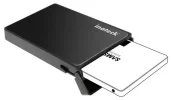
One last thing: any "internal" SSD can be used externally in an enclosure. Basically they're just sleeves that the drive slides into and snaps shut. Most offer one or more interfaces to the drive, USB3.0 being the norm, so it's just a USB cable into your box or laptop (or tablet or smartphone, assuming you've got the hardware/software to support OTG -- "On The Go" -- USB). The point being that one enclosure used for multiple drives is very much possible, if such a thing is of interest to you. The enclosures will often accept 2.5" HDDs too, those are the slim hard drives used in laptops.

ssd-enclosure_w600.webp
 
As others have probably said I'm sure but main things would be:

SSD drive - The standard Samsung offerings are very good performers for the proce. I bough a Samsung 840 ssd or whatever it's called about 3 years ago and it's had heavy use/abuse but still performs tops today.

A quality motherboard from a good company is essential imo - one that has a decent chipset and is known to be reliable (good wuality capacitors etc. not sure if it's relevent today as I'm going from the 2005 era when I used to work in IT - soo many dodgy boards with leaking capacitors but maybe today it's not much of an issue.)

Decent ram with heatsinks as well, and a decent PSU. And finally something i think is also essential is good cooling/airflow with a clean build/cables neatly tied/no clutter.

Pictures/specs when you get it :)
 
In general yes, dead easy, done it many times.

Two caveats: 1) if the drive is really old you might have cabling issues (eg. IDE vs SATA), and 2) it is seldom worth it because old HDDs fail a lot quicker than you'd think and their capacity is usually peanuts compared to new drives.

In recent years all I do is migrate the data from the old drive to something new -- pretty trivial these days -- and either use the old HDD as a scratch drive or just junk the damn thing. I've had far too many hard drives fail over the years to think of them as permanent storage, they are ephemeral and you're only borrowing them for a while. The great hardware compost heap will recall them all too soon. Especially Seagate 1.5 and 2TB drives ( :mad: ).

The external storage thing is a great idea and easier than ever these days. Go for USB3.0 as a minimum interface. Seriously consider going SSD instead of HDD, bit pricier at the outset but far less prone to failure (provided you use an appropriate enclosure, or a sealed unit). Don't buy cheapo non-name stuff here, completely false economy. Do your research and read the reviews or ask someone knowledgeable for recommendations: there is huge variance in reliability and longevity between brands and the results do not follow traditional branding patterns. In other words famous Brand X in the HDD scene may not make (or be reselling) good SSDs, and vice versa.

Fully agree there. Mine is SSD with USB 3.0 and came with a 10 year warranty.

I do always try to reduce the amount of cables and adapters to the lowest possible. Can't stand it when my bag is cluttered with those. :eek:

What i also did is concentrating on one brand, in my case it is Samsung - got laptop, pico projector, mobile phone, camera, TV and the external HD from them and it is just brilliant as they are all fully compatible without any additional software/cable adapters etc etc. :thumbsup:

E.g.
- place my mobile phone close to the laptop and it automatically synchronizes, got it set-up to do it 2 x weekly :thumbsup:
- pico projector connects to laptop or phone; great when a customer is asking for a quick presentation. They are always so surprised when i take then my phone and that little projector (about double the size of a cigarette pack), connect them and project a 1x1m large sharp image on the wall. Just one short cable needed to connect the projector to the phone as it can run up to 2 hrs on battery. :thumbsup:

EDIT: The external SSD hard drive does not have a power cable as it takes it from the USB port when i plug it in.
 
Last edited:
Hi all, I've been offered the following, thoughts please (mainly the value for money aspect)

Budget can't do SSD at the moment even after today's fantastic result but from my limited knowledge it would serve my daily needs (at least for now) and make my current PC look like a lego brick!

AMD 3.4 GHZ Quad Core
8GB DDR3 1600
500 GB HD 7200rpm sata 3
Biostar A88 USB3 Mainboard
2xDVD RW Drives

Would also include licensed copy of Windows and MS Office

Quoted £300

:confused::confused:

Cheers
 
Last edited:
Hi all, I've been offered the following, thoughts please (mainly the value for money aspect)

Budget can't do SSD at the moment even after today's fantastic result but from my limited knowledge it would serve my daily needs (at least for now) and make my current PC look like a lego brick!

AMD 3.4 GHZ Quad Core
8GB DDR3 1600
500 GB HD 7200rpm sata 3
Biostar A88 USB3 Mainboard
2xDVD RW Drives

Would also include licensed copy of Windows and MS Office

Quoted £300

:confused::confused:

Cheers

Looks pretty good. A few things:

- why 2 DVD RW drives - are you using them? I haven't had one in 6 years now and never missed it. If no, then leave them out and you might have enough for an SSD drive
- what Graphics card does it have?

Sorry can't say anything about the price as my last PC purchase goes back to 1996 with Win3.1, only had laptops since.
 
Hi all, I've been offered the following, thoughts please (mainly the value for money aspect)

Budget can't do SSD at the moment even after today's fantastic result but from my limited knowledge it would serve my daily needs (at least for now) and make my current PC look like a lego brick!

AMD 3.4 GHZ Quad Core
8GB DDR3 1600
500 GB HD 7200rpm sata 3
Biostar A88 USB3 Mainboard
2xDVD RW Drives

Would also include licensed copy of Windows and MS Office

Quoted £300

:confused::confused:

Cheers

Pointless DVD drives. 1 if you really DO need one.
HDD crud.
You can get 500GB Samsung SSD for 200.
What graphics card? You'll need a good spec for slotting/videoing.

Really, if you're up anything near what your videos show lately, get that SSD!!

You'll be peed off in 12 months when you try a SSD or use one and may regret not getting it now.:)
 

Users who are viewing this thread

Accredited Casinos

Read about our rating system and how it's done.
Back
Top