external image

3Dice video problems.

skiny

Banned User - violation of <a href="http://www.cas
Joined
Oct 30, 2008
Location
Canada
This whole rebooting everytime I want to use the 3Dice software is really getting annoying.

I've been using this video card for over a year. I'm using the drivers that came with it on the CD. The only software that's ever had a problem with is is 3Dice.
 
Do people not read and take the advice already given in another thread?

I swear I'm going to quit helping people out with their computer problems if they're not even going to at least TRY the suggestions given. I have the exact same video card, and have experienced the exact same symptoms you have. It's the video drivers. Either upgrade them or downgrade them to a version that 3Dice likes. It's worked for me, and it'll work for you. If you don't want to even try it, then sorry, but quit *)&#$@! about it!

Sorry to be frank, but geeze.

PS: It's not just 3Dice, either. It's NVIDIA's fault when you break it down. I've had this happen with several games where the video was choppy and all that good stuff...and the only thing that fixed it was a different version of the video drivers. Imagine that?

https://www.casinomeister.com/forums/threads/3dice.31121/

https://www.casinomeister.com/forums/threads/3dice.31121/
 
Hmmmm, Win is right- you have purchased a card a year ago and only used the cd it came with.. let me tell you by the time you purchased you graphics card that cd it came with would of been out of date.

Please go to the official site for the graphics card and go to "download drivers" find the card that is yours and install the drivers.
As win said sometimes you need to find the best drivers as some may cause further problems for you but its pretty safe to say you can download the whole lot and wont get any problems.

If it is a nvidia card there driver section is very user friendly.

Here is the link to the nvidia driver download. for example I'am running SLI Geforce ( dual graphics cards) and they are 8800gtx ultra's so I go to product type, Geforce > Product series the 800 series > for vista 32 bit > and of course lanuage is english USA.

Once you do this click on download and install the drivers, then it will prompt you tp turn the system off and on again and BAM!!!- your good to go


We need a techies fee Win :thumbsup:


Sorry I forgot to give the link for the driver section on the nvidia site
You do not have permission to view link Log in or register now.
 
My computer is far from low grade and I'm far from computer illiterate. I have upwards of 70 programs on this computer that all work fine ranging from brand new to a decade old. I watch blu-ray movies on my computer. The video I create with 3ds Max never fails. I've never had a game fail.

If upgrading the video drivers might help I'll give it a try but if I can run virtually anything on this computer without a hitch except 3Dice it's kind of unfair to blame my computer.

I have stalled on upgrading my video drivers because of one question. What happens when I upgrade my video drivers and 3Dice works fine but 12 other programs don't? Besides, every other casino software on the market seems to work fine. 3Dice seems to be special.
 
My computer is far from low grade and I'm far from computer illiterate. I have upwards of 70 programs on this computer that all work fine ranging from brand new to a decade old. I watch blu-ray movies on my computer. The video I create with 3ds Max never fails. I've never had a game fail.

If upgrading the video drivers might help I'll give it a try but if I can run virtually anything on this computer without a hitch except 3Dice it's kind of unfair to blame my computer.

I have stalled on upgrading my video drivers because of one question. What happens when I upgrade my video drivers and 3Dice works fine but 12 other programs don't? Besides, every other casino software on the market seems to work fine. 3Dice seems to be special.

It isn't going to affect the other programs. Take it or leave it. I have over 16 years experience with computers, so I think I know what I'm talking about. I also do blu-ray, have over 1.5TB storage, 6gb ram, FX-62 AMD DC 64bit cpu, the same 8600GT pciex card, etc....so my machine is definitely not low-end either. I built it myself, as I have done with all of my computers since 1994.

It's NOT blaming your computer, it's the way that 3Dice is coded. As I mentioned above, take it or leave it, but if you want to continue playing at 3Dice, you have to do something about your drivers, plain and simple...if you want to complain to anyone, get on them at 3Dice about it...I'm just offering a solution that will work, and won't affect any other programs. We're only talking about video drivers here, not a huge system overhaul.

Oh, and didn't I mention in the other thread that Enzo is fully aware of this issue (has been for months), but instead of figuring out a perm fix for this to be 100% compliant/compatible with NVIDIA drivers, it's still not "fixed"....
 
I installed the latest drivers. No change.

It's NOT blaming your computer, it's the way that 3Dice is coded. As I mentioned above, take it or leave it, but if you want to continue playing at 3Dice, you have to do something about your drivers, plain and simple...if you want to complain to anyone, get on them at 3Dice about it...

See, now we have to go back through all the posts in all the threads and tell everyone not to complain about a particular casino problem here and to "get on the actual casino about it."

This might take a while.
 
I installed the latest drivers. No change.


See, now we have to go back through all the posts in all the threads and tell everyone not to complain about a particular casino problem here and to "get on the actual casino about it."

This might take a while.

I give up.

I don't know why you created a 2nd thread in the first place over the same exact issue. But anyways if you go read the other thread, you'll see that I mentioned that the newest drivers aren't always the best drivers. I actually had to downgrade mine for it to work, and it didn't affect any other programs/games.

I said that you should complain to 3Dice about it, because they're the ones at fault here, not anyone else.

Have fun figuring it out, I just get tired of trying to help people that aren't appreciative of it.
 
I give up.

I don't know why you created a 2nd thread in the first place over the same exact issue. But anyways if you go read the other thread, you'll see that I mentioned that the newest drivers aren't always the best drivers. I actually had to downgrade mine for it to work, and it didn't affect any other programs/games.

I said that you should complain to 3Dice about it, because they're the ones at fault here, not anyone else.

Have fun figuring it out, I just get tired of trying to help people that aren't appreciative of it.

I wasn't aware that complaining here meant you were blaming someone here.

Sometimes reinstalling drivers does effect other programs. Sometimes it effects your entire system. The fact that you're saying that sometimes upgrading and sometimes downgrading finally finds the drivers that work with this particular program means in itself that some programs only work with some drivers. I have about 6 dozen programs on this computer and all work fine except 3Dice.

I tried the latest drivers and have no idea if they've effected any other programs yet. They didn't change anything with 3Dice. I thank you whole heartedly for your suggestion and very much appreciate it but I'm not going to keep uninstalling and reinstalling every backward version I can find until I find the correct one hoping it doesn't screw something else up.

If some magic version of these drivers does work then maybe 3Dice should be at the very least telling people which one that is and then hopefully someday figure out what the difference is with these drivers and all the others.

By the way. I'm new to the entire forum routine barring a few bulletin boards in the early 90s with my old 2.4kb modem. Creating a second thread was a mistake.
 
I wasn't aware that complaining here meant you were blaming someone here.

Sometimes reinstalling drivers does effect other programs. Sometimes it effects your entire system. The fact that you're saying that sometimes upgrading and sometimes downgrading finally finds the drivers that work with this particular program means in itself that some programs only work with some drivers. I have about 6 dozen programs on this computer and all work fine except 3Dice.

I tried the latest drivers and have no idea if they've effected any other programs yet. They didn't change anything with 3Dice. I thank you whole heartedly for your suggestion and very much appreciate it but I'm not going to keep uninstalling and reinstalling every backward version I can find until I find the correct one hoping it doesn't screw something else up.

If some magic version of these drivers does work then maybe 3Dice should be at the very least telling people which one that is and then hopefully someday figure out what the difference is with these drivers and all the others.

By the way. I'm new to the entire forum routine barring a few bulletin boards in the early 90s with my old 2.4kb modem. Creating a second thread was a mistake.


Skinny, what about Falsh and java??- have you updated those into your system as well?- you also need these latest versions to run certain programs etc.
 
Everything is updated and working perfectly on my computer. Thanks for all your help but I'm not going to keep mucking around with my computer trying to get this casino to work right. I appreciate all of the input but I don't want to be sitting around next week trying to figure out why the casino works good now but something else more important doesn't.
 
You are right Rob..he didnt say that...i just thought that if you are spinning the slots in tourneys...and since we can all see good tourney wins... and i do see skiny playing....well....i thought it was all good.

(((HUGS))) Trollet
 
The only solution, other than changing drivers, is to reboot....

I kinda like when that happens if I'm in tournament mode, because I could care less about the graphics. With the way it acts, it's running about 10x+ the normal turbo mode and you can get thousands of spins in compared to regular turbo mode :D
 
Well I'm getting problems with 3Dice now, having 3Dice on my CP is making everything run slow. Even playing MG slots, to booting up a casino-last 300 sites you name it, it's slow. This is a big problem for me, as I like the tourns there. But can't keep on reinstalling every time for use.

You let one in-and it all goes to shit. :p
 
Hi skiny!
Nice to see you finally got your problem solved.
Atleast you are getting some good wins in the tourneys so it cant be that bad :) WTG :)

(((HUGS))) Trollet

I guess I should have said everything except 3Dice. But it's ok. It's annoying but it's not the end of the world. I tried the latest drivers and everything else is up to date so I'm just going to leave it alone before I muck something else up.
 
Well I'm getting problems with 3Dice now, having 3Dice on my CP is making everything run slow. Even playing MG slots, to booting up a casino-last 300 sites you name it, it's slow. This is a big problem for me, as I like the tourns there. But can't keep on reinstalling every time for use.

You let one in-and it all goes to shit. :p

Having 3Dice on your computer or while 3Dice is running? If it's not running I don't see how it can effect your other programs.
 
Having 3Dice on your computer or while 3Dice is running? If it's not running I don't see how it can effect your other programs.

Just having 3Dice on my CP is causing me problems, I have doubled checked. Funny because I have not had a single problem with 3Dice before.

It started today when I was playing a tourn, the reels kept on spinning real choppy. Then I got the same thing at a MG casino, plus I noticed how ever thing was taken so long to load. I uninstalled 3Dice-played a micro and it was gone. Then I reinstalled 3Dice, played a Micro and got choppy reels again, plus a slower PC, again.
 
The only solution, other than changing drivers, is to reboot....
There is one other solution - buy a new PC!
3Dice just would not run on my 4-year old laptop, though all other softwares did.
But it works just dandy on my new laptop - I'd never seen the games running 100% properly before, and they are even more fantastic than I thought! :thumbsup:

KK
 
There is one other solution - buy a new PC!
3Dice just would not run on my 4-year old laptop, though all other softwares did.
But it works just dandy on my new laptop - I'd never seen the games running 100% properly before, and they are even more fantastic than I thought! :thumbsup:

KK

KK...................


The card has NOTHING to do with it. It's a year old, so what. It's a driver issue, plain and simple. If anyone is to blame, it's NVIDIA, and 3Dice for not keeping up with compliance with their drivers. The reason your laptop works great is because more than likely you have an ATI based chipset and not NVIDIA. Video cards with an ATI chipset have no problems with 3Dice.

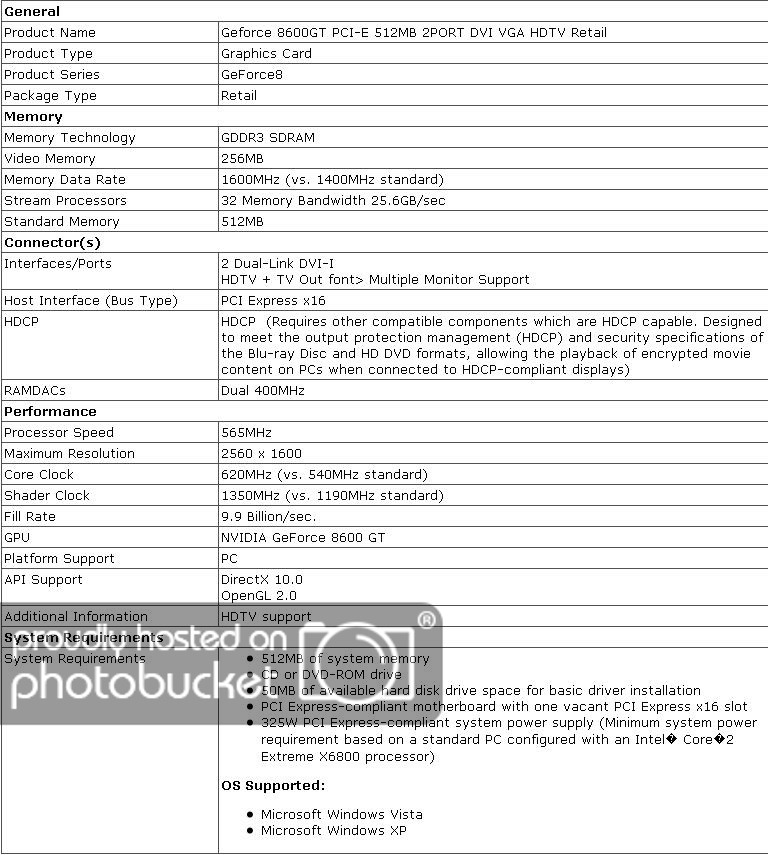
In fact, I'd put my video card (I have the same card as the OP) up to your new laptop's card any day of the week, and it'll still run circles around it. This isn't some $30 card, it's more near the $200 range. And my PC is hardly low-end. For instance, I can convert video to DVD/whatever format at a rate of 130+ FPS, play blu-ray movies without a hiccup, etc (on a 40" HDTV, at that)...can you do that on your laptop? :p A 'new pc' is hardly in order...

ps: When 3Dice works right on my PC, I can max out the FPS (whatever 3Dice has set as the limit) in any of their games which is what, 55-60fps, now? How many people can say that?

pps: Buy a new pc? nah.......I build my own....:D

Old / Expired Link

softbyweb_2050_1165355


8600gt_specs.jpg
 
Last edited:
I just had a thought, Winbig. (Yes I do that sometimes.)

Maybe you can go into your system information and tell me which driver version you are running. It would be interesting to see if installing the same driver version solves my problem with 3Dice.

I have version 6.14.11.8585

I know I said I wasn't going to keep mucking around with it but if I knew exactly which version worked for you I'd try it.
 
I just had a thought, Winbig. (Yes I do that sometimes.)

Maybe you can go into your system information and tell me which driver version you are running. It would be interesting to see if installing the same driver version solves my problem with 3Dice.

I have version 6.14.11.8585

I know I said I wasn't going to keep mucking around with it but if I knew exactly which version worked for you I'd try it.

Good thought, but I recently upgraded to XP x64 (x32 only sees 3gb ram max, and I have 6), so I'm not sure which x32 version drivers worked....
 
Thanks anyway.

Anyone else have a working version of nvidia drivers for 3Dice?
 
Thanks anyway.

Anyone else have a working version of nvidia drivers for 3Dice?

If you tell me what I'm looking for (LOL), I'll try to help. Don't get your hopes up though...somedays opening my email is a challenge for me. :laugh:

I have GeForce 7100/NVIDIA nForce...now how do I tell which drivers I have installed? I haven't touched the thing since I got it, and 3Dice works fine for me. Like KK, I was using an old piece of crap before this one.....and didn't really understand what the 3Dice games were all about...until I got the new puter. What a difference!!

So it's 2 Gigs or RAM, Intel Dual Core Processor (1.8 GhZ, I think), and there's 256 MB of dedicated video memory. I seem to remember a while back people having problems with MG software, due to there not being enough dedicated memory, and once they adjusted that....it worked much better. Think it was Simmo actually. No idea if that has anything to do with 3Dice as well.

In the NVIDIA Control Panel, it gives a spec titled Video BIOS Version: 5.73.32.08.01 Is any of that useful? I swear to God, I'm hopeless.
 
KK...................


The card has NOTHING to do with it. It's a year old, so what. It's a driver issue, plain and simple. If anyone is to blame, it's NVIDIA, and 3Dice for not keeping up with compliance with their drivers. The reason your laptop works great is because more than likely you have an ATI based chipset and not NVIDIA. Video cards with an ATI chipset have no problems with 3Dice.

In fact, I'd put my video card (I have the same card as the OP) up to your new laptop's card any day of the week, and it'll still run circles around it. This isn't some $30 card, it's more near the $200 range. And my PC is hardly low-end. For instance, I can convert video to DVD/whatever format at a rate of 130+ FPS, play blu-ray movies without a hiccup, etc (on a 40" HDTV, at that)...can you do that on your laptop? :p A 'new pc' is hardly in order...

ps: When 3Dice works right on my PC, I can max out the FPS (whatever 3Dice has set as the limit) in any of their games which is what, 55-60fps, now? How many people can say that?

pps: Buy a new pc? nah.......I build my own....:D

Old / Expired Link

softbyweb_2050_1165355


8600gt_specs.jpg

I think a lot of the 3Dice graphics issues revolve around the OpenGL format. Last year I was using an ATI card and it didn't work worth a $hit and I upgraded to the one that actually replaced the GeForce 8600GT, the GeForce 9500GT and I have not found anything so far that it is not capable of, at least not yet anyway.
 
If you tell me what I'm looking for (LOL), I'll try to help. Don't get your hopes up though...somedays opening my email is a challenge for me. :laugh:

I have GeForce 7100/NVIDIA nForce...now how do I tell which drivers I have installed? I haven't touched the thing since I got it, and 3Dice works fine for me. Like KK, I was using an old piece of crap before this one.....and didn't really understand what the 3Dice games were all about...until I got the new puter. What a difference!!

So it's 2 Gigs or RAM, Intel Dual Core Processor (1.8 GhZ, I think), and there's 256 MB of dedicated video memory. I seem to remember a while back people having problems with MG software, due to there not being enough dedicated memory, and once they adjusted that....it worked much better. Think it was Simmo actually. No idea if that has anything to do with 3Dice as well.

In the NVIDIA Control Panel, it gives a spec titled Video BIOS Version: 5.73.32.08.01 Is any of that useful? I swear to God, I'm hopeless.

You're far from hopeless. There's all kinds of useful information in there. But it's not the same card so the drivers wouldn't be the same. Thanks anyway.
 

Users who are viewing this thread

Accredited Casinos

Read about our rating system and how it's done.
Back
Top