external image

New Forum upgrade

My "What's new" tab and my "Today's posts" (overlaidby CM casinos) do the same things:confused: And as chayton pointed out the view leaders (under the quick links) goes to a list of Reps which is very difficult to read...

I hope to fix this in the next day or two. I've added 5 tabs at the top (Main Site, Rogue Pit, CM Casinos, CM News, Newsletters) because they need to be linked from here. As soon as I have another section of the forum built (Content Management System section for you webmasters), the rest of the website should be linked properly and I can remove those tabs. That will keep your browser from wigging out.
 
Will Chayton be getting "Quality Controller" Salary? ;)
And are any other postions open?

Getting paid to snoop - that would be my DREAM JOB! :D

I was thinking that what might be helpful is for people who are seeing anything like tabs not lining up or being on top of something to say what browser they're using and what their screen resolution is. I'm at 1440x900 and that's fine, but if I size the window down, the text on the top (gold) menu bar first slides over under the search box, and if I keep making my browser smaller, the the buttons on the gold bar jump down to underneath the text on the red menu bar and I feel like I'm drunk.

So if you have a smallish screen res it would probably look like that all the time. :(
 
The PAB FAQ

I have a suggestion regarding the PAB and it's FAQ.

in the 'forms' tab the only option there is PAB, but it does not describe what that actually is... maybe a short blurb for the benefit of noobs so they know what they're about to click? :cool:

Also... on that form it states that you have to read the full PAB FAQ before carrying on, but apart from the rules on the form itself I could not find a comprehensive pab faq easily. I had to back out of the forum to the homepage, click the pitch a bitch tab in the left column there, and scoll down to click on the words 'extensive faq'. I'm guessing a fair % of the people who PAB are quite agitated and may not be in to seaching for it before submitting. Has that ever happened Max? ;) I would suggest linking a pop up from the form with the full pab rules... so they can browse them without losing their place.

I wasn't sure if this had already been suggested, so before posting this put 'faq' and 'pab faq' into the forum search box and was told: ''The following words are either very common, too long, or too short and were not included in your search.'' . If other players do the same thing maybe setting it so that those specific searches take you there would be useful. Can you see what terms are being searched for with your admin access?

Anywhoot.. just a suggestion so you can take it or leave it. I shall get back to work now :)
 
Last edited:
On a good note, for the first time ever my thanks button actually works smoothly. It use to be I would click on it, the page would have to reload to get it posted. Now it is finally easy and less frustrating to back tab or go forward, without the page reload.

If this is not new and just me.....Yay! I love it. :)
 
I find one thing, no, two things to improve on in this upgrade:]
  • The scrolling, especially on the What's New page, lags. The scrolling doesn't move exactly with the movement of the mouse wheel. It is easy to over-scroll.
  • In the previous version of the forum the thread titles stood out more. The colors of the titles are too "soft" even in bold. It is harder to visually skim for interesting threads.
 
Personally, I find the worst thing thats missing is the yellow background.
Cant get used to this hard white/grey with blue headers.:(
CM was the yellow forum and I loved that!

Never fear; I still have to build that template. Hoping for time tomorrow.
 
I can't find an option to change my avatar anymore? Can't see where to add a signature etc... either. All I seem to be able to do is customise the colours when I select 'customise profile' and I'm able to edit my about me.


I'm sure it's there but I can't find it.

any help would be great! Thanks. :D

Cheers
Gremmy
 
I can't find an option to change my avatar anymore? Can't see where to add a signature etc... either. All I seem to be able to do is customise the colours when I select 'customise profile' and I'm able to edit my about me.


I'm sure it's there but I can't find it.

any help would be great! Thanks. :D

Cheers
Gremmy

Hi Gremmy,

I had the same issue, thinking the avatar update would be in 'my profile', but i finally found it in 'settings' in the column on the left hand side. Hope that helps. I can give ya a screen shot if you need it. :)
 
Thanks PlexRep.

I have edited the things I want. :thumbsup:

Three questions though....

1) Why is my avatar so small? Others are huge and mine is so tiny!:( I'm assuming this is to do with being relatively new? If so when can I upload a larger file?

2) I can't upload a Gif File as it just uses the first frame as a static avatar. Others have Gif's and they work. :( Once again am assuming It's coz I'm a newbie? I had a really cool Gif I wanted to use and It wouldn't work so used plan B instead!

3) Why is my signature picture doing this? (*)

Cheers
Gremmy

arrow-down.gif
(*)
 
Hi MaxD,
This is in no way a nasty jab at you. I just noticed when I read the PAB page out of curiosity This section in the blurb before you submit a PAB. I would normally just ignore things like this but thought I'd point this out as CM is such a well respected place.

The following statement could be considered highly offensive to people with a family member that is stricken with a condition such as this. ;)

I know this was probably done with a humouress intent but will fall flat with many people with this in their lives.
Just food for thought is all!
Love your work and love CM! :thumbsup:
Just a friendly suggestion.

Cheers
Gremmy

* Ensure you state your First and Last name in the name field.
* AOL, Hotmail and Yahoo email addresses are not acceptable since these companies at random discard casino related email. Please use an email address from another server.
* PLEASE make an effort to spell correctly and use proper English grammar, punctuation, and capitalization. Most of the information submitted is forwarded to the casino. You don't want to look like a retard, do you?
 
Thans CM.

I'm no wowser and would normally say nothing about it. I'm not even particularly offended by it! Just noticed it and it stood out to me.
Guess I looked at it as unprofessional.
I'd assumed it was written many moons ago before CM was such an important and respected site?! So figured I'd add my two cents and point it out.

I appreciate that you treat CM members so fairly and value our opinions. That is why CM is where it is today IMO!:thumbsup:

Cheers
Gremmy
 
For you old-timers who liked the way Casinomeister looked back in the day, check out the Casinomeister "Classic Gold" template. Just scroll on down to the bottom left side of any page in the forum, and you'll see your choices. Pick it and it'll automatically load.

It still needs some work, I'll be tweaking it early next week. I just thought I'd make it available for everyone since a number of you have requested it.

Have a nice weekend! :thumbsup:
 
FWIW, I get the following when I look at the Forum Rules:
Warning: fetch_template() calls should be replaced by the vB_Template class. Template name: navbar in [path]/includes/functions.php on line 4097

Parse error: syntax error, unexpected T_STRING in /home/casinome/public_html/forums/forum_rules.php(43) : eval()'d code on line 1

Warning: fetch_template() calls should be replaced by the vB_Template class. Template name: forum_rules in [path]/includes/functions.php on line 4097

The Rules page appears immediately after, so the page comes up per normal only with the error stuff at the top of the page.
 
The rules have always been a separate php page that I designed myself back in the day, but since vBull has rewritten all of their code, I'll have to do it again. :rolleyes: I'll probably just incorporate this into the FAQ.
 
hello

Hey I don't know if this upgrade is over yet, but it does look good. I joined just yesterday and its good for me. I do not know how this forum looked earlier, but as of now, it seems cool.
 
I can't find the other thread on the upgrades...so I will ask here and hopefully that is ok. Will the threads that are read disappear and only the new ones not read show when you are done upgrading? Will all the threads read please disappear like it used to instead of 3 pages of threads that are showing that are just taking up space? That is one of the features I mis the most, the new threads only showing up. The way it is now, I have to go up and down the darn sheilds to see if I read what I wanted..just wondering/suggesting.

.
 
I can't find the other thread on the upgrades...so I will ask here and hopefully that is ok. Will the threads that are read disappear and only the new ones not read show when you are done upgrading? Will all the threads read please disappear like it used to instead of 3 pages of threads that are showing that are just taking up space? That is one of the features I mis the most, the new threads only showing up. The way it is now, I have to go up and down the darn sheilds to see if I read what I wanted..just wondering/suggesting.

.

There are two links you can use. There is the "Today's Posts" link on the far left section of the Forum tab. This gives you all new posts read or not. What you are looking for is the "What's New?" tab (it's in the middle of the navigational toolbar between Member Blogs and Main Site). Click this and you will have a list of only unread posts. That should do it :D
 
My what's new tab gives me every post on the forum that I haven't read(including really really old ones) Is there a way to select 'mark all as read' or something similar to allow it to only show unread posts since my last logon?
Just want it to have a blank list so that I can start from scratch and read the ones that are new to me but don't pre-date my joining CM.


Cheers
Gremmy


.....add.... Is it because I never log out? every time i click my bookmark I am already logged in? the home page with the box up the top updates correctly though and shows posts I've read and ones I haven't but when it is busy it has them all lit up and I have to use 'what's new' to check for others(which is when the problem occurs)
 
Last edited:
I like the new look a lot, but this is kinda weird... just in the last couple days, it seems like scrolling around the forum has suddenly gotten really slow, just when I'm looking at one thread and scrolling up and down the page in Firefox. It wasn't doing this right after the upgrade. If I sit and look at the site for too long, my fan goes on. I feel like there's some new Javascript loop happening that's eating up a lot of CPU cycles...?

edit: This is also showing up a lot in firebug:
Permission denied for <http://www.32red.com> to call method Location.toString
maybe their ad is trying to do something funny...
 
My what's new tab gives me every post on the forum that I haven't read(including really really old ones) Is there a way to select 'mark all as read' or something similar to allow it to only show unread posts since my last logon?
Just want it to have a blank list so that I can start from scratch and read the ones that are new to me but don't pre-date my joining CM.


Cheers
Gremmy


.....add.... Is it because I never log out? every time i click my bookmark I am already logged in? the home page with the box up the top updates correctly though and shows posts I've read and ones I haven't but when it is busy it has them all lit up and I have to use 'what's new' to check for others(which is when the problem occurs)
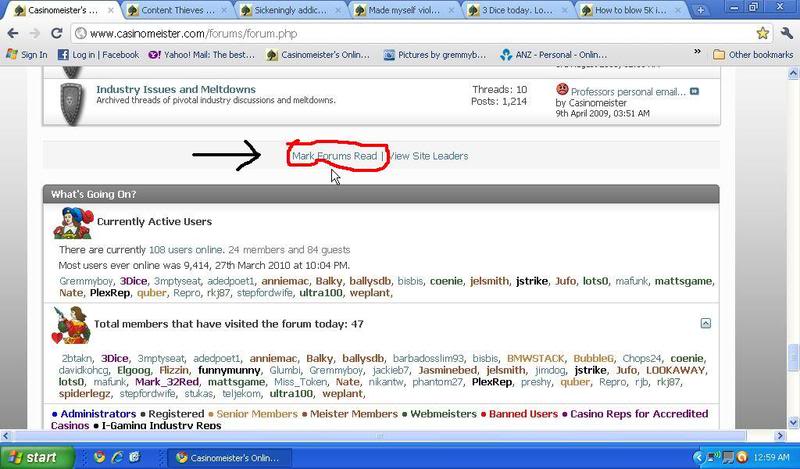
You're going to have to do this by hand in each forum. In each forum, you'll see "Forum Tools" - select "Mark Forum Read" and it'll mark all threads "read". It might take you a few minutes, but it can be done. :D

I like the new look a lot, but this is kinda weird... just in the last couple days, it seems like scrolling around the forum has suddenly gotten really slow, just when I'm looking at one thread and scrolling up and down the page in Firefox. It wasn't doing this right after the upgrade. If I sit and look at the site for too long, my fan goes on. I feel like there's some new Javascript loop happening that's eating up a lot of CPU cycles...?

edit: This is also showing up a lot in firebug:
Permission denied for <http://www.32red.com> to call method Location.toString
maybe their ad is trying to do something funny...

It's the tourney leader boards. As soon as I get the CMS up and running (next week), they will be moved to there. That should make the forum screamingly fast. :D
 
Why do you tortue an old soul??

There are two links you can use. There is the "Today's Posts" link on the far left section of the Forum tab. This gives you all new posts read or not. What you are looking for is the "What's New?" tab (it's in the middle of the navigational toolbar between Member Blogs and Main Site). Click this and you will have a list of only unread posts. That should do it :D

Ok, thank you..you're the best..but you got to stop hiding these things from an old lady..I never knew that , thats what that was for..thank you !! (Lots of "thats" :lolup:) ....
 
You're going to have to do this by hand in each forum. In each forum, you'll see "Forum Tools" - select "Mark Forum Read" and it'll mark all threads "read". It might take you a few minutes, but it can be done. :D

Thanks for that!:thumbsup:

I went through and did it and it fixed the problem, However once I was finished I noticed this at the bottom of the forums....:eek2:

cmforum.jpg


Could've done it with one press! :p lol

Cheers
Gremmy
 
Help!

I just bothered poor Annie with this question..and it is driving me crazy...where is the edit option to change your wording under the avatar now??? I have been searching forever for this..Sheesh...HELP! And where is the darn "HELP" button???? Looked for that too...

I feel better now...needed to get the frustration off my chest..thanks for listening! :thumbsup:

.
 
This maybe it.
Optional Information - All information will be viewable by other forum members.
Custom User Title:
Your current user title is
Reset
This is the title that appears beneath your name on your posts. Check the 'Reset' box if you wish to use the default title for your usergroup and post count.


Link Outdated / Removed
 
This maybe it.
Optional Information - All information will be viewable by other forum members.
Custom User Title:
Your current user title is
Reset
This is the title that appears beneath your name on your posts. Check the 'Reset' box if you wish to use the default title for your usergroup and post count.


Link Outdated / Removed
THANK YOU!!!! You are the best!​
 

Attachments

  • cheer.gif
    cheer.gif
    27.8 KB · Views: 79
I have the same thing but only when using my netbook, so think it's to do with your resolution?
When I use my laptop or PC the wrapping disappears and the forum displays correctly. :)

Cheers
Gremmy

no doubt.

I'm at 1024x768 on a 22" monitor but I could stretch the window and it would correct, however that is no longer the case.

I'm certain if I up the res it will be ok.
 

Users who are viewing this thread

Accredited Casinos

Read about our rating system and how it's done.
Back
Top