
Casinos By Status
Popular Filters
By Banking Options
All Games
Popular Bonus Filters
Popular Forums
Forum User Features
Submit A Complaint (PAB)
PAB Rules and Guidelines
Browse PABs
Popular News Sections
About Us

You should upgrade or use an alternative browser.
i will be the first
- Thread starter rockycatt
- Start date


- Joined
- Sep 16, 2003
as i will use the info delivered here , way more than i can supply the info
Ditto!


- Joined
- Sep 12, 2004
- Location
- Up$hitCreek
as i will use the info delivered here , way more than i can supply the info
Me too, Rocky...
ummm... Rocky.... where's the pizza? LOL

harrys99
Dormant account
- Joined
- Oct 26, 2011
- Location
- Wherever I Want
and beer?Mousey could you repost a link here to that article that showed you how to check your computer for some kind of massive internet problems that are supposed to hit this summer? Also somewhere you had given someone instructions how to upload youtube videos-if you could outline that it would be great

Hoping there are some members who are Windows 7 savvy. I have found it to be NOT user friendly.
- Joined
- May 10, 2009
- Location
- Wait'n for a payout!
Mousey could you repost a link here to that article that showed you how to check your computer for some kind of massive internet problems that are supposed to hit this summer? Also somewhere you had given someone instructions how to upload youtube videos-if you could outline that it would be great
Hoping there are some members who are Windows 7 savvy. I have found it to be NOT user friendly.
harrys99, here's that link again per your request. Hope it helps.

- Joined
- Dec 16, 2004
- Location
- Palm Bay Florida
You have some great pizza places in town.


Lets all go to Boston to see Rockycatt
You have some great pizza places in town.
View attachment 32677View attachment 32678
pizza go here ---->


- Joined
- Aug 25, 2004
- Location
- Bexhill on sea, England
Me too.:Hoping there are some members who are Windows 7 savvy. I have found it to be NOT user friendly.
My wife has Windows 7 on her laptop - and it just confuses the hell out of me.
I can't even find the very simple "search" feature which is in the start menu of XP and before!

And the "paint" program is definitely inferior to the XP version.
Actually, I'm pretty worried about it because my Laptop seems to be on it's last legs. When I bought it 3 years ago I specifically went for one which allowed me to DOWNGRADE it from the crap Vista to XP.
If I have to buy a new one soon, I'm guessing that wont be an option any more...

KK

- Joined
- Jul 27, 2007
- Location
- Here
 I've been reduced to using my daughters' computer (temporarily) which has Vista and it's a royal PITA! I'm sure if I had to use it day-in-and-day-out I'd get used to it, but to use it once in a while sux. And if I go to my sons' house to use his compouter I'm on windows 7, my PC is XP. I need to get my internet service back or get a different (more reliable) provider. I've been without internet now for 11 days and the satellite company is saying they can't do anything for me for at least another 10 days
- Joined
- Sep 12, 2004
- Location
- Up$hitCreek
Me too.
My wife has Windows 7 on her laptop - and it just confuses the hell out of me.
I can't even find the very simple "search" feature which is in the start menu of XP and before!
And the "paint" program is definitely inferior to the XP version.
Actually, I'm pretty worried about it because my Laptop seems to be on it's last legs. When I bought it 3 years ago I specifically went for one which allowed me to DOWNGRADE it from the crap Vista to XP.
If I have to buy a new one soon, I'm guessing that wont be an option any more...
KK
You might find a refurb with winxp on it, KK.
Hubby's desktop is nine years old... we've upgraded it as far as we can go. It's past due for replacement, but won't turn loose of it as it has winxp pro on it. LOL I have Vista on mine and he knows he doesn't want that. He's tried my laptop with win7 on it, and he hates it, too. So.... I guess as long as he can get to chiptalk and 2 +2 (when it comes back up) and LOLCats, and watch a youtube every now and then, he'll hang onto it a bit longer.
I can't even find the very simple "search" feature which is in the start menu of XP and before!
Just open windows explorer. It's on the top right corner beside the address bar. In xp using the search feature would open windows explorer. Now it's just part of the window.

- Joined
- Nov 18, 2006
- Location
- US
Botton left hand corner, formerly start, click it and you should find search at the very bottom.
Vista did suck donkey balls.........however windows7, I really like.
- Joined
- Nov 18, 2006
- Location
- US

- Joined
- Mar 19, 2008
- Location
- Denmark
Make sure casino window is active.
Alt+ Prt Scr
open paint
Shift+Insert
Save as .jpg
harrys99
Dormant account
- Joined
- Oct 26, 2011
- Location
- Wherever I Want

harrys99
Dormant account
- Joined
- Oct 26, 2011
- Location
- Wherever I Want
Ok so on my laptop it is the FN key and the prtsc key then cntrl plus V
Wow that is going to take some practice. On my computer you have to search to find the paint program which is part of what was hanging me up.
Thank you all for your helpful suggestions.
@KK there is hope for us
- Joined
- Sep 12, 2004
- Location
- Up$hitCreek
Go to Programs, then Accessories, then when you see PAINT right click on the proggie and then Send To, then click Desktop (create shortcut). That will put a shortcut right there for when you need it.
For those that don't care for Paint, I recommend a little freeware proggie, IrFanView.
Oh... and when you make and save a screenie, pay attention to where it's going to be saved. (I've lost more than one that way. LOL)
harrys99
Dormant account
- Joined
- Oct 26, 2011
- Location
- Wherever I Want
They don't make Paint easy to find, do they?
Go to Programs, then Accessories, then when you see PAINT right click on the proggie and then Send To, then click Desktop (create shortcut). That will put a shortcut right there for when you need it.
For those that don't care for Paint, I recommend a little freeware proggie, IrFanView.
Oh... and when you make and save a screenie, pay attention to where it's going to be saved. (I've lost more than one that way. LOL)
Mousey-
In vista and xp boom programs-accessories
but even now when I go to programs I can't find accessories. I had to find paint by going to Windows help and typing in find paint.

- Joined
- Dec 18, 2011
- Location
- Sweden

harrys99
Dormant account
- Joined
- Oct 26, 2011
- Location
- Wherever I Want
A win 7 awesome feature is the ability to attatch the stuff you use most to the activity field. The search functions is also really improved from vista and xp.
View attachment 32721
So is it possible to add paint to the bottom of your screen like in your picture above?
So is it possible to add paint to the bottom of your screen like in your picture above?
(Win7)
Find paint in accessories or where ever you found it last, right click it and drag it down to your quick launch bar, let it go on an empty place on the bar.
It should look like this while you're holding it over the bar-

harrys99
Dormant account
- Joined
- Oct 26, 2011
- Location
- Wherever I Want
Ahh finally that did work. I don't know if it's because my laptop is Toshiba (first time to have this brand) or something got erased when I did a system restore after a a virus removal but things are just not located in easily findable places.
Also get blue screens and white screens all the time when trying to do something so simple as edit a post. Do not have that at all on Vista when I check the forum from work.

:notworthy
Ahh finally that did work. I don't know if it's because my laptop is Toshiba (first time to have this brand) or something got erased when I did a system restore after a a virus removal but things are just not located in easily findable places.
Also get blue screens and white screens all the time when trying to do something so simple as edit a post. Do not have that at all on Vista when I check the forum from work.
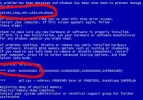
Next time you get the blue screen, write these bits circled in red down. Maybe we can pin point the cause.
harrys99
Dormant account
- Joined
- Oct 26, 2011
- Location
- Wherever I Want
Next time you get the blue screen, write these bits circled in red down. Maybe we can pin point the cause.
View attachment 32735
Thank you Skiny
The "blue screens" are a lighter hue of blue. Example: after selecting the edit post button I am not able to type any text because the whole box is shaded in and therefore no ability to type text in it. It takes about 10 refreshes to bring up a white screen with text in it.- Joined
- Jul 11, 2008
- Location
- On the Beach
Next time you get the blue screen, write these bits circled in red down. Maybe we can pin point the cause.
View attachment 32735
I have had 3 computers thrown away because of "bluescreen". If you check google "bluescreen" there is about a million ways suggested to fix it. Of course I didn't try all million ways so gave up now have a tiny acer good enough for online casinos
If there is a way to avoid it please , please tell here
Thanks

- Joined
- Apr 18, 2009
- Location
- Sweden
I have had 3 computers thrown away because of "bluescreen". If you check google "bluescreen" there is about a million ways suggested to fix it. Of course I didn't try all million ways so gave up now have a tiny acer good enough for online casinos
If there is a way to avoid it please , please tell here
Thanks
I had the blue screen a lot on my computer, and some other problems with starting up windows.
I bought new memory, and the problem was fixed.
Sometimes there is an easy solution, but just changing memory felt almost too easy after having those problems for six month.
I have had 3 computers thrown away because of "bluescreen". If you check google "bluescreen" there is about a million ways suggested to fix it. Of course I didn't try all million ways so gave up now have a tiny acer good enough for online casinos
If there is a way to avoid it please , please tell here
Thanks
Well, there shouldn't be a million ways suggested because the blue screen does tell you where the problem originated.
I was getting the blue screen for a week or so. I knew from the information on the blue screen that it was my video card. I installed the latest drivers even though I knew that probably wouldn't help but it was worth a shot.
Then a couple of days ago I finally did what I figured would help. I pulled video card out, blew the cooling fan and heat sink out with a can of air and put it back. No more blue screen.
Updating the drivers was just my lazy way of trying to get out of pulling the computer out of the little cubby hole it's sitting in beside me. What a pain.
- Joined
- Mar 19, 2008
- Location
- Denmark
Thank you Skiny
Have you updated your Java lately. Sounds like it could be an older Java version causing that in the forum. ?
- Joined
- Aug 25, 2004
- Location
- Bexhill on sea, England
I agree.Have you updated your Java lately. Sounds like it could be an older Java version causing that in the forum. ?
You do not have permission to view link Log in or register now.
That problem does not sound like it is anything to do with Windows - more likely a browser or Java problem.
@ harrys99: Which browser are you using? Have you tried a different one?
KK

Actually, I'm pretty worried about it because my Laptop seems to be on it's last legs. When I bought it 3 years ago I specifically went for one which allowed me to DOWNGRADE it from the crap Vista to XP.
If I have to buy a new one soon, I'm guessing that wont be an option any more...
I use an excellent program called 'Classic Shell', it changes the Start menu of Windows 7 so that it works just like XP, but much better because you can also customize it exactly how you want (including adding a Search menu), so the end result is better than XP ever was
And it's free (open source) available from :Also another free program '7 Taskbar Tweaker' lets you customize the taskbar so that everything works however you want :
If you use both programs together to customize everything, I think you might actually enjoy Windows 7 more than XP!
- Joined
- Jul 27, 2007
- Location
- Here
harrys99
Dormant account
- Joined
- Oct 26, 2011
- Location
- Wherever I Want
Have you updated your Java lately. Sounds like it could be an older Java version causing that in the forum. ?
You do not have permission to view link Log in or register now.
Thanks Lahutti-I just now saw your post. Think I will look in to your suggestion over the long weekend.
harrys99
Dormant account
- Joined
- Oct 26, 2011
- Location
- Wherever I Want
I agree.
That problem does not sound like it is anything to do with Windows - more likely a browser or Java problem.
@ harrys99: Which browser are you using? Have you tried a different one?
KK
Sorry KK just today saw some of these posts. I use IE8. Of course I am constantly prompted to go to ie9 but I tried it and really didn't like it. I will look into the Java issue this weekend and report back.
Thank you for your input
@Ksech Thank you for bringing this thread back up or I would have missed the above posts!
- Joined
- Sep 12, 2004
- Location
- Up$hitCreek
I'm taking lots of notes here, so when my system dies (hopefully not anytime soon!) I have some reference notes to fall back on! My son is bound and determined to get me a laptop instead of a pc. Although I may not have to worry about it if my internet (That it took them a month to fix) doesn't start working correctly
I have a laptop. It's newer, faster, and more up to date (quad core, win7, ie9, etc.) than my old duo core desktop. But. I almost never use the darn thing. Which reminds me, this weekend will be a good time to plug it in, and let it gets its bazillion MS updates and recharge. Occsionally I will use it in the den if there's something I want to watch on the big screen TV, or in the kitchen when I've downloaded a recipe I want to try. And another... I hate trying to surf/type while attempting to balance the thing on my lap. Got a little lap desk, but it doesn't really help much. If I'm going to sit a desk or table anyway, gimme a desktop.
I have to keep it plugged in most of the time... battery only lasts a couple of hours on it. For another, I can't type on the blasted thing. You think my typonese is bad on a desktop, you should see what happens when I try to type on the laptop. LOL
However, when I was away from home most of 2010, I would have been lost without it. It kept me sane. LOL
I also have a little 10" netbook. I use it more than the 15.6" laptop, as I can just drop the netbook and a mini usb mouse into my oversized purse and lug it around with me when I'm going to be sitting in doctor's offices for hours. It has a 6 cell battery and will stay up and running (for what I use it for) for 6 hours without needing charging. I don't see that I could do much of anything very useful on it, but it's great for reading a .pdf book/mag, or playing a simple hidden object game, or Chuzzle
, or catching up on emails (if there's free wireless). It is useful in helping pass the time...
- Joined
- Jul 27, 2007
- Location
- Here
Geez, my 9 year old grandson had to show me the proper technique to playing Angry Birds on facebook so I could beat his mom LOL And my 13 year old grandson had to show me how to set up my bluetooth for my cellphone (which I decided I didn't really like or need so I gave it to him when all was said and done). I can't imagine what it will be like trying to figure out how to operate a laptop. My kids better be ready for a gazillion text messages and phone calls LMAO
harrys99
Dormant account
- Joined
- Oct 26, 2011
- Location
- Wherever I Want
Sorry KK just today saw some of these posts. I use IE8. Of course I am constantly prompted to go to ie9 but I tried it and really didn't like it. I will look into the Java issue this weekend and report back.
Okay I upated my Java version and also found that I had a corrupt Microsoft Silverlight version-so got that repaired. Now it only takes about 5 refreshes to edit a post instead of 10 LOL...
It does seem better overall though.
harrys99
Dormant account
- Joined
- Oct 26, 2011
- Location
- Wherever I Want
Next time you get the blue screen, write these bits circled in red down. Maybe we can pin point the cause.
View attachment 32735
This is what I meant by blue screen or that it is all shaded in blue and unable to type text in it. Sometimes it still takes about 10 refreshes when editing or replying to posts. Any suggestions? This never happens when I post from work on my vista desktop. Only on this win7 laptop.

harrys99
Dormant account
- Joined
- Oct 26, 2011
- Location
- Wherever I Want
Does it happen with all browsers or just IE?
Have only used IE on this laptop.
Just installed firefox-issue gone.
Thanks!

Similar threads


- Replies
- 10
- Views
- 992
- Replies
- 10
- Views
- 916

- Replies
- 40
- Views
- 3K

