external image

Intensive care

At the beginning of the week, my big PC (the one I use for casinos) decided it no longer had any interest in booting to Windows:-


Keyboard Failure
System battery voltage is low.
Press F1 to continue, F2 to enter SETUP.


Not normally an issue...... unless it's a DELL E521 it seems:mad:

Spent the rest of the week on the crappy little budget backup machine downstairs, that is only slightly better than my original Windows 98 machine when it comes to launching MGS casinos.

It seems I am not alone, it is a disease that many elderly DELL desktops have DIED from:eek2:

So many threads, so many theories, but so far NO-ONE has managed to find a permanent solution that does not involve a new motherboard.

The problem is, there is actually nothing wrong at all, just a lack of a PS/2 port on DELL motherboards that prevents the obvious emergency recovery solution, a legacy PS/2 keyboard to grant access to the BIOS, and hopefully investigate and repair the issue, or at least get past the error by pressing F1.

One theory is that there is a design flaw in the USB, and it can "blow" when over taxed, such as by using it with Apple devices which use USB to charge themselves up.

Oddly enough, there IS power still arriving at the USB ports, just that the motherboard can't seem to recognise them, or their attached devices.

Keyboard failure still occurrs when booting with no keyboard plugged in, so it is not a diagnostic of a broken keyboard.

Having spent a couple of days trying all the suggested solutions, I decided to begin the process of ordering a replacement.

"The beast", clearly worried by this, decided to forget about a "keyboard failure" early this afternoon, and allowed me into SETUP.

I noticed "CMOS checksum error" being reported in the BIOS event log, along with the errors that were showing on screen.

Perhaps this is a clue to the true nature of this issue - there are many thousands of people wanting to know.

I am now back in, but things are somewhat "buggy", and the boot has to be forced via pressing F1, which I can now do.

It seems others have reported sudden, but temporary, restored access.

I have already set the BIOS not to report keyboard errors, which has been suggested as a way of preventing this "catch22" situation from ocurring then next time the system can't "see" the USB or keyboard.

The next step appears to be riskier than betting £75 a spin on Munchinks after a nice hit, flashing the BIOS with the latest version from DELL that has "enhanced USB support" listed as one of the fixes.

This may well be "kill or cure".


If I vanish from the forum again, and reps notice me not deposting so much, assume the outcome was "kill", but I will be back....... eventually.


PS - I DID replace battery, and it was indeed dead (0.18V, should be 3V) - but it made no difference. I am in now by pure luck. No idea what I did, other than surgically remove a diseased secondary hard drive and take it apart out of curiosity before scrapping it (it was dead anyway, and it now most certainly IS dead beyond repair).
 
Is there no jumper on your MB to reset Bios with?.

Yes, did this when removing the diseased hard drive. Maybe this is what got me back in, although I have seen it written that removing the battery should give the same result, and appeared to as I then got an additonal "floppy seek error" for a floppy drive my PC doesn't have, which is a default state of the BIOS.

I still had to boot a couple more times to clear a cascade of other spurious errors related to what BIOS thought had been happening.


It seems the only "official" solution from DELL is to replace the motherboard, but they have been discontinued long ago, and are "proprietry", so a generic replacement would not fit the case, nor probably the processor. In other words, get a new PC.

Today I resigned myself to having to bring this forward, else be unable to gamble (except frustratingly slowly on a Celeron underpowered machine).

At least it died AFTER I had played at Lucky Nugget last week, so any replacement will be pretty decent (NOT an Alienware, nor another DELL).

I also considered getting a cheapish "bundle" and building another PC out of the working bits and upgrade parts I had for this one. The 24" monitor still works OK:) At least a screwup will be relatively inexpensive, and not a complete disaster.

Had it not been for the low powered backup machine, I would have been REALLY screwed, as I would have been unable to research the problem on the internet, nor look for replacements online.

It has taken DELL some 4 years to NOT find a solution to this problem (other than to sell you another DELL), and no-one in "geekland" has yet come up with a definitive diagnosis and fix. It's all "try this, it worked for me" followed by "doesn't work for me though, next please".

I even considered soldering a PS/2 port onto the motherboard, but it seems DELL don't even have the "pinout" for it, and it's position on the header is already occupied by the audio outputs and rear USB ports. PCI has been suggested, but this would require drivers, so would not work until the OS had loaded, so not a credible solution.

luckily, I have spent nothing so far, the "new" system battery being kidnapped from the spare keyfob for my car.
 
have a look on the gumtree website im sure you can find something on there for a very good price
i have a watercooled intel i5 2500k overclocked @ 3.3 ghz and 12gb of corsair ram it can run multiple mgs casinos lag free :P
i got this rig for £500 off gumtree i priced all the parts and it was over £1000 to build myself from microdirect and scan
i have it conected to my tv in my liveing room and use a wireless keyboard and mouse
its the future :)
 
Good luck VWM! :thumbsup:

Please... no Dell next time. ;) I've never had one because I have read of them having quite a bit of proprietary innards... making repairs quite a PITA. And do pop in and fill us in on the new baby should you go that route.
 
Yes, did this when removing the diseased hard drive. Maybe this is what got me back in, although I have seen it written that removing the battery should give the same result, and appeared to as I then got an additonal "floppy seek error" for a floppy drive my PC doesn't have, which is a default state of the BIOS.

I still had to boot a couple more times to clear a cascade of other spurious errors related to what BIOS thought had been happening.


It seems the only "official" solution from DELL is to replace the motherboard, but they have been discontinued long ago, and are "proprietry", so a generic replacement would not fit the case, nor probably the processor. In other words, get a new PC.

Today I resigned myself to having to bring this forward, else be unable to gamble (except frustratingly slowly on a Celeron underpowered machine).

At least it died AFTER I had played at Lucky Nugget last week, so any replacement will be pretty decent (NOT an Alienware, nor another DELL).

I also considered getting a cheapish "bundle" and building another PC out of the working bits and upgrade parts I had for this one. The 24" monitor still works OK:) At least a screwup will be relatively inexpensive, and not a complete disaster.

Had it not been for the low powered backup machine, I would have been REALLY screwed, as I would have been unable to research the problem on the internet, nor look for replacements online.

It has taken DELL some 4 years to NOT find a solution to this problem (other than to sell you another DELL), and no-one in "geekland" has yet come up with a definitive diagnosis and fix. It's all "try this, it worked for me" followed by "doesn't work for me though, next please".

I even considered soldering a PS/2 port onto the motherboard, but it seems DELL don't even have the "pinout" for it, and it's position on the header is already occupied by the audio outputs and rear USB ports. PCI has been suggested, but this would require drivers, so would not work until the OS had loaded, so not a credible solution.

luckily, I have spent nothing so far, the "new" system battery being kidnapped from the spare keyfob for my car.

And here`s me thinking my AGP set up is horrendously outdated lol, and tbh I don`t think i`ll change it unless I take up gaming again.
 
have a look on the gumtree website im sure you can find something on there for a very good price
i have a watercooled intel i5 2500k overclocked @ 3.3 ghz and 12gb of corsair ram it can run multiple mgs casinos lag free :P
i got this rig for £500 off gumtree i priced all the parts and it was over £1000 to build myself from microdirect and scan
i have it conected to my tv in my liveing room and use a wireless keyboard and mouse
its the future :)

Out of curiosity do you have a 64bit version of windows 7 running?.
 
And here`s me thinking my AGP set up is horrendously outdated lol, and tbh I don`t think i`ll change it unless I take up gaming again.


Packard Bell Club77, 500Mhz processor, Windows 98 SE - still just about alive (monitor died, but will work with the one from the crappy DELL). Now that IS outdated, but it outlasted a DELL Dimension E521.

I saw a nice cheap laptop on Gumtree, but nothing much in the way of a truly distinctive desktop. I have my eye on one, custom built, and pretty pricey, but with 66K well on it's way from Lucky Nugget, very affordable.


It would be interesting to see my niece's face when she walks in to find it where this E521 should be:D

I can just imagine her jaw drop, W....... T......... F...... Uncle B:eek2:


When she wants a go, I'll tell her to "go find the E521, this one is strictly off limits":p


If it boots up with "keyboard failure", I will say WTF - you've broken it!, do you know how much that cost!! (back in 2007):icon_twis
 
yes it come with a legitimate copy of widows 7 64 bit think u need 64 if you want to use more than 4gb of ram
unless your into games music production graphic desingn etc you dont really need a superfast pc as you wont be useing it to its full potential anyway so no need to be running that 1000 watt power suply either
 
So at this point what errors do you have? Just the missing keyboard error or are there others?

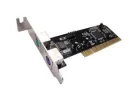
If you ignore the keyboard error will one of these work once you boot to windows?
 

Attachments

  • 15-124-061-04.webp
    15-124-061-04.webp
    5 KB · Views: 312
You wouldn't need windows drivers for a ps2 card.

Sneaking it past the bios is the only trick.
 
So at this point what errors do you have? Just the missing keyboard error or are there others?

If you ignore the keyboard error will one of these work once you boot to windows?

Some E521 users have tried this, but it only starts working once in Windows. The issue is that this error ocurrs during the boot, and requires a responce from the keyboard in order for further progress to be made. The rear pair of USB ports are SUPPOSED to be supported by the BIOS, and so should carry keyboard instructions at this stage. The problem is that for some reason these ports just stop working, so the user cannot get past the error condition, either to continue or to enter SETUP. The ONLY way past this is to not have this error occur, which is what happened earlier today to let me back in.

If this error returns, I still have the same problem.

PS/2 is supposed to be better in these circumstances since it is independent of USB and any driver issues, being supported directly by it's own motherboard micro controller. DELL ditched PS/2 because it was considered outdated. Unfortunately, this left a vulnerabilty in it's machines that renders them useless in the event of a USB issue at boot time, even though it may only be a configuration issue and easily corrected once in SETUP. A perfectly good machine can be rendered an expensive paperweight just because of a bit of cost cutting.


In looking around, I notice that even the latest PCs from the niche custom builders all have "a single PS/2 keyboard port". It seems this is an issue well known to designers, and although PS/2 ports tend to go unused, they can be very useful in resolving BIOS problems that prevent USB keyboards from working.

Adding PS/2 via a PCI card may not be the same as adding them direct to the motherboard. I presume this is because PS/2 is "emulated" once booted to the OS, and thus would require the OS to be running.

There is also a product that plugs direct into the motherboard where the PS/2 support exists, but has not been used in the build. Unfortunately, this does not seem to be the case with the E521.

I now have to take my chances every time I boot this PC, and only time will tell whether I have shocked it into working properly, or whether I simply got lucky and got it to boot up this time.

I am also wondering whether a PSU problem could cause these issues, perhaps with the output being borderline, and now having dropped with age to the point where it can randomly fail to provide enough power to all critical components during boot.

I already have another (better) PSU, one that is SUPPOSED to fit, but I will probably find there is some oddity that means it doesn't quite fit.

The documentation says the PSU is ATX, yet I am reading that the boards used are BTX proprietry boards, which is why even the case can't be reused. This has confused me somewhat, as opening the side clearly exposes what looks like a standard PSU, and the new one will fit in the space provided.

The views have changed from when I last looked into how to upgrade this PC without paying well over the odds for parts via DELL.

Oddly enough, DELL and Alienware still appear to dominate the "best buy" reviews - something fishy seems to be going on here, as it seems those who REALLY know what they are talking about are saying steer well clear of DELL.

I see the Gadget Show have got their perspective right, they have listed an Alienware as a "budget" gaming PC, with a "good" and "best" in the class not being from DELL.

I remember when Alienware was considered the very best money could buy, but it now seems pretty "uncool". DELL seem to have ruined the brand.

I doubt even the best Alienware will impress anyone now, no matter how much "bling" it packs.

I am looking at something so unusual that I expect it will really stand out, yet it seems to work out cheaper than some of the top XPS and Alienware boxes.

If anything, it is the case that does the impressing, but what's inside has to be good enough not to disappoint. It does mean using SSD with MGS casinos, something I have been reluctant to do. I may go for the bigger SSD to take account of MGS updates wearing it out.

It would be better to be able to have the MGS cache elsewhere.

At least if this PC manages to pull through, I will have more time to consider my choices.
 
yes it come with a legitimate copy of widows 7 64 bit think u need 64 if you want to use more than 4gb of ram
unless your into games music production graphic desingn etc you dont really need a superfast pc as you wont be useing it to its full potential anyway so no need to be running that 1000 watt power suply either

Aye any RAM over 4gb is pretty much waisted on a 32bit OS as it`s not recognised by windows.

@VWM By Jesus, is that set up your upgrade from an Commodore Amiga lol?:)
 
Some E521 users have tried this, but it only starts working once in Windows. The issue is that this error ocurrs during the boot, and requires a responce from the keyboard in order for further progress to be made. The rear pair of USB ports are SUPPOSED to be supported by the BIOS, and so should carry keyboard instructions at this stage. The problem is that for some reason these ports just stop working, so the user cannot get past the error condition, either to continue or to enter SETUP. The ONLY way past this is to not have this error occur, which is what happened earlier today to let me back in.

If this error returns, I still have the same problem.

PS/2 is supposed to be better in these circumstances since it is independent of USB and any driver issues, being supported directly by it's own motherboard micro controller. DELL ditched PS/2 because it was considered outdated. Unfortunately, this left a vulnerabilty in it's machines that renders them useless in the event of a USB issue at boot time, even though it may only be a configuration issue and easily corrected once in SETUP. A perfectly good machine can be rendered an expensive paperweight just because of a bit of cost cutting.


In looking around, I notice that even the latest PCs from the niche custom builders all have "a single PS/2 keyboard port". It seems this is an issue well known to designers, and although PS/2 ports tend to go unused, they can be very useful in resolving BIOS problems that prevent USB keyboards from working.

Adding PS/2 via a PCI card may not be the same as adding them direct to the motherboard. I presume this is because PS/2 is "emulated" once booted to the OS, and thus would require the OS to be running.

There is also a product that plugs direct into the motherboard where the PS/2 support exists, but has not been used in the build. Unfortunately, this does not seem to be the case with the E521.

I now have to take my chances every time I boot this PC, and only time will tell whether I have shocked it into working properly, or whether I simply got lucky and got it to boot up this time.

I am also wondering whether a PSU problem could cause these issues, perhaps with the output being borderline, and now having dropped with age to the point where it can randomly fail to provide enough power to all critical components during boot.

I already have another (better) PSU, one that is SUPPOSED to fit, but I will probably find there is some oddity that means it doesn't quite fit.

The documentation says the PSU is ATX, yet I am reading that the boards used are BTX proprietry boards, which is why even the case can't be reused. This has confused me somewhat, as opening the side clearly exposes what looks like a standard PSU, and the new one will fit in the space provided.

The views have changed from when I last looked into how to upgrade this PC without paying well over the odds for parts via DELL.

Oddly enough, DELL and Alienware still appear to dominate the "best buy" reviews - something fishy seems to be going on here, as it seems those who REALLY know what they are talking about are saying steer well clear of DELL.

I see the Gadget Show have got their perspective right, they have listed an Alienware as a "budget" gaming PC, with a "good" and "best" in the class not being from DELL.

I remember when Alienware was considered the very best money could buy, but it now seems pretty "uncool". DELL seem to have ruined the brand.

I doubt even the best Alienware will impress anyone now, no matter how much "bling" it packs.

I am looking at something so unusual that I expect it will really stand out, yet it seems to work out cheaper than some of the top XPS and Alienware boxes.

If anything, it is the case that does the impressing, but what's inside has to be good enough not to disappoint. It does mean using SSD with MGS casinos, something I have been reluctant to do. I may go for the bigger SSD to take account of MGS updates wearing it out.

It would be better to be able to have the MGS cache elsewhere.

At least if this PC manages to pull through, I will have more time to consider my choices.

I would guess that if your board doesn`t have a PS/2 port the respective MB drivers would not be there either (is there an PS/2 port option to enable/disable in BIOS?) if not there is a fair chance that a PCI card wont fix the problem as this would rely on your OS to have the relevant drivers, and these obviously wont load until windows boots up.
 
Aye any RAM over 4gb is pretty much waisted on a 32bit OS as it`s not recognised by windows.

@VWM By Jesus, is that set up your upgrade from an Commodore Amiga lol?:)

If I buy new, it will be Windows 7 Ultimate 64 bit. If I wait too long, I will be forced to have Windows 8. I remember the fuss surrounding Vista, so stuck with XP even though I have the Vista upgrade CD ROM.

Just checked, and I now have full possession of my 66K win from last week. Half is on it's way to my bank, and some more will probably follow next month.

Cue phonecall from bank manager wanting to "discuss my account", (sell me an investment product):rolleyes:

I had the same in 2009 after the big 32Red fruitie win, every damn time I went to the counter to pay in a cheque I was invited for an "account review". I was always far too busy at the time, maybe later:D
 
If I buy new, it will be Windows 7 Ultimate 64 bit. If I wait too long, I will be forced to have Windows 8. I remember the fuss surrounding Vista, so stuck with XP even though I have the Vista upgrade CD ROM.

Just checked, and I now have full possession of my 66K win from last week. Half is on it's way to my bank, and some more will probably follow next month.

Cue phonecall from bank manager wanting to "discuss my account", (sell me an investment product):rolleyes:

I had the same in 2009 after the big 32Red fruitie win, every damn time I went to the counter to pay in a cheque I was invited for an "account review". I was always far too busy at the time, maybe later:D

I hate Vista with a passion, it is the most condescending windows version to date, the amount of fcking clicking needed just to open a basic application (until you streamline the default settings) does my head in "Are you sure you want to click on that nasty .exe file?, shall we wait for the grown ups to come back?, I think we should, shouldn`t we?".

Gratz on your winnings btw ;).
 
The reason I tell people not to buy Dell or any other custom brand is they're a pain to fix or upgrade yourself. I've always just ran clone systems and I rarely change more than a single part in my computer. I changed the Video card once because I saw a better one on sale for example. I can swap motherboards in this computer pretty cheap and easily.

The ps2 card might not work but they only cost 5 or 6 bucks.

I fried the power supply in this computer a couple of years ago and suddenly started having random internet connection problems. I picked up a 5 dollar ethernet card and quit using the on board connection and I've been downloading at 5 mb/s minimum and haven't lost my connection since.

I'm running a 64 bit system with 32 bit windows installed which really makes no difference to me except for the limits on ram. My next upgrad will be to a 6 core processor and then I'll go to 64 bit windows so I can bump it up to 8 gig ram. I thought about an 8 core but at the time I was looking at these I read some weird stories about them not being true 8 core processors but worst of all the selection of motherboards that would accept the cpus was really limited and ridiculously expensive. Maybe I'll go back and re-look at that option. Things change.

I'm not into gaming but 3DS Max really bogs down when it's rendering 3D graphics and it's one of the few programs I've seen with an actual option to use all available cpus so I figure that'll speed up the painful rendering time of 3D movies.

I've been saying I'm going to do this upgrade for over a year but I'm really just too lazy to disassemble and reassemble my entire computer and then reinstall windows and the 50 or more programs installed in it. Specially since the only thing that really gets bogged down is 3DS Max.

I think the last time I actually bought a whole computer was in the late 90s. This might even be the original box. I just keep doing my own upgrades when things slow down. That's the beauty of owning a clone system.
 
In a way, I wish I could build my own system... But I can't see it coming out any cheaper than retail for built system, I just don't have the time, and I'm thinking I gotta buy something before the change over to Win8 this fall/winter.

I'm not a gamer, but I try to buy 'up' (when i do buy) as I keep computers for 5 to 7+ years, upgrading as the years go buy. Problem I'm seeing is, I'm looking at core i7 systems that have (for instance) 12 g RAM installed with specs that state max 16g RAM. WTF?? That leaves no 'upgrade' left as far as RAM is concerned, as I'd bump it up to 16g ASAP after purchase. I'm lost when looking at the motherboard specs, but isn't that where all that is decided? along with the OS, of course. And I'd want Win7 64 bit, so it should handle whatever I'd ever want to throw at it. So I'm not understanding the 16g max RAM thing....

And now (after VWM's Dell problems) I've got to remember to check and make sure there's a PS2 port on whatever I'm looking at. LOL
 
The reason that there is only 4gb of upgradable space left is that the motherboard they are useing is not high end problably not even mid end scale by todays standards
you may have to take the pc to them to install the extra ram moduels or risk voiding your warranty
saying that though if your not a gamer you probably will never use anywhere near 12gb of ram anyway and will see no benefit in upgrading a vidio card
as a gamer i have allways custom built my machines apart from the 1st pc i bought as a noob which was not upto the task of gameing at all so £300 down the drain as it was not worth upgrading so i learned the hard way
i built a nice pc in 2007 which cost me £1200 it was when core 2 duo was pretty new and the 8800gtx graphics card had just come out and like a dick i bought 1 for neally £500over the next few years every conponent of that pc died apart from the cpu ram and hardrive.
the graphics card should of had a lfetime warrenty but you have to register the card with evga within 3 weeks of buying it to activate warrenty which i didnt do the card had lasted neally 3 years anyway so not to bad
i actualy fixed it for a while by taking off the fan and heatsink and putting it in the oven at 190 for a few mins which re melts solder sorting any broken conections similer to the xbox 360 red ring towel trick :)
when u build a high - mid spec pc its sort of like buying a car you lose alot of the value as soon as you buy it because new tech comes out so fast
i dont think i would build a pc from new again because u can save so much by buying second hand 6 month old tech
 
Why would anyone want Windows 8?

Remember the "Every second MS OS is crap" rule. ;)
 
Precisely. That's why I want a new computer (w/Win7 64 bit) before winter when the new 'off the shelf' computers all have only Win8 on them.

I'm sure some places would install Win7 instead of 8 except maybe the big box stores.
 
I'm sure some places would install Win7 instead of 8 except maybe the big box stores.

Maybe some smartass could buy up a load of retail copies of Windows 7 and then when the complaints start rolling in sell them at a mark up. The problem is down to Microsoft, who discontinue an earlier OS once the new one is launched. This severely limits the options for resellers to stick with an earlier version, unless they have them in stock.

I wonder if a Windows 8 license key would work on a copy of Windows 7 "borrowed" from somewhere else.;)

It's also a good reason to get my next PC, as this one was ordered in the dying months of Windows 7, and I would have ended up with VISTA, and a year of troubles with my casinos.

Building one's own PC does open up the options, as any available retail OS can be installed, even bought in advance of the project if it is likely to no longer be available.

I have done my own upgrades, but I have never built one from scratch. It's something I may well try just to see how well I do. So long as I have a decent new PC up and running, it won't matter if things don't go smoothly.

I don't see the actual build being the problem, it's choosing the right bits to fit together.
 
Maybe some smartass could buy up a load of retail copies of Windows 7 and then when the complaints start rolling in sell them at a mark up. The problem is down to Microsoft, who discontinue an earlier OS once the new one is launched. This severely limits the options for resellers to stick with an earlier version, unless they have them in stock.

I wonder if a Windows 8 license key would work on a copy of Windows 7 "borrowed" from somewhere else.;)

It's also a good reason to get my next PC, as this one was ordered in the dying months of Windows 7, and I would have ended up with VISTA, and a year of troubles with my casinos.

Building one's own PC does open up the options, as any available retail OS can be installed, even bought in advance of the project if it is likely to no longer be available.

I have done my own upgrades, but I have never built one from scratch. It's something I may well try just to see how well I do. So long as I have a decent new PC up and running, it won't matter if things don't go smoothly.

I don't see the actual build being the problem, it's choosing the right bits to fit together.

If you're happy some of your parts why buy all new? MB and CPU for sure. Ram if your old ram doesn't fit the MB or you want to add more. Maybe video card if yours is out of date. A new case if you're tired of looking at your old one. Hard drive is usually fine. In most cases people don't need brand new computers although Best Buy will be happy to tell you you do.

The only problem comes when you don't know how to fix them. Then you might want a new one that has a warranty.
 
If you're happy some of your parts why buy all new? MB and CPU for sure. Ram if your old ram doesn't fit the MB or you want to add more. Maybe video card if yours is out of date. A new case if you're tired of looking at your old one. Hard drive is usually fine. In most cases people don't need brand new computers although Best Buy will be happy to tell you you do.

The only problem comes when you don't know how to fix them. Then you might want a new one that has a warranty.

Hard drive died:mad:

I expect to have two decent PCs minimum, one that is REALLY good, the other built from leftovers if necessary for lighter duties and visitors.

I can then mess around experimenting with building from parts, and then compare with the other two.

I had intended the E521 to be upgradeable in the longer term, but it is limited by too much proprietry stuff. We were wedded to DELL at work, and they had all the government contracts. DELL was the only major PC company I knew, and I considered them a better bet than the high street, dominated by Dixons, Currys, and PC World, that seemed to keep screwing up.

I had no idea then that there were specialist companies that bought in the best parts from a variety of sources, selected the best for matching up, and building custom machines. DELL use all their own parts, even if they are not as good as what is freely available.

Even more irritating, it is hard to reuse the case because of it's non standard features.

I can see the attraction of buying parts, as one can make sure they stick to standards that can be used with a wide variety of other parts.

Luckily, I have £66000 to have fun with after last week, so no cutting corners necessary. £40,000 has now exited my Neteller and is on it's way to my bank, where it will be used for non gambling purposes. This still leaves me far more in my Neteller than I normally have available.

The first chunk has been spent already, premium solar panels for the UK FIT scheme, which effectively turns the money into a 25 year annuity yielding around 8%, possibly more if it is sunny more than usual:D

The next chunk may end up as a conservatory at the back, somewhere to sit, relax and play other than the TV room or the back room that has now got a fair bit of stuff in it.

There will also be a new kitchen and bathroom involved.

These are the kinds of things that tend to be a bit pricey, like the house that was finally paid off by 32Red in 2009:p
 
Hard drive died:mad:

I expect to have two decent PCs minimum, one that is REALLY good, the other built from leftovers if necessary for lighter duties and visitors.

I can then mess around experimenting with building from parts, and then compare with the other two.

I had intended the E521 to be upgradeable in the longer term, but it is limited by too much proprietry stuff. We were wedded to DELL at work, and they had all the government contracts. DELL was the only major PC company I knew, and I considered them a better bet than the high street, dominated by Dixons, Currys, and PC World, that seemed to keep screwing up.

I had no idea then that there were specialist companies that bought in the best parts from a variety of sources, selected the best for matching up, and building custom machines. DELL use all their own parts, even if they are not as good as what is freely available.

Even more irritating, it is hard to reuse the case because of it's non standard features.

I can see the attraction of buying parts, as one can make sure they stick to standards that can be used with a wide variety of other parts.

Luckily, I have £66000 to have fun with after last week, so no cutting corners necessary. £40,000 has now exited my Neteller and is on it's way to my bank, where it will be used for non gambling purposes. This still leaves me far more in my Neteller than I normally have available.

The first chunk has been spent already, premium solar panels for the UK FIT scheme, which effectively turns the money into a 25 year annuity yielding around 8%, possibly more if it is sunny more than usual:D

The next chunk may end up as a conservatory at the back, somewhere to sit, relax and play other than the TV room or the back room that has now got a fair bit of stuff in it.

There will also be a new kitchen and bathroom involved.

These are the kinds of things that tend to be a bit pricey, like the house that was finally paid off by 32Red in 2009
:p

:notworthy :notworthy :notworthy
 
Pass the 40k over here. I'll see if I can figure out how to get you 36 cores running simultaneously, four 2 gig video cards and a terabyte of ram all pinched into one case.

Lets do it.
 
Pass the 40k over here. I'll see if I can figure out how to get you 36 cores running simultaneously, four 2 gig video cards and a terabyte of ram all pinched into one case.

Lets do it.

Microgaming don't need that kind of challenge, else I will be the only one able to play there, and noone will fill the fruities up for me after I have emptied them.

In the above specification, I already have the case sorted - the conservatory:)
 
Microgaming don't need that kind of challenge, else I will be the only one able to play there, and noone will fill the fruities up for me after I have emptied them.

In the above specification, I already have the case sorted - the conservatory:)

Hopefully after I get everything installed on my SSD Microgaming will be able to load in about 3 seconds. Not that I have any immediate plans to use the software.
 
Solar panels done and producing a nice harvest of free electricity to provide free air conditioning in my gambling room (bedroom), as well as run the washing machine, PC, and TV for free till sunset.

Just started the process of getting quotes and designs for the conservatory.

I still have my eye on a very nice and pretty unique new PC, no corners cut, no expense spared (within reason, given I am not into high end 3D multiplayer gaming):D
 
Solar panels done and producing a nice harvest of free electricity to provide free air conditioning in my gambling room (bedroom), as well as run the washing machine, PC, and TV for free till sunset.

Just started the process of getting quotes and designs for the conservatory.

I still have my eye on a very nice and pretty unique new PC, no corners cut, no expense spared (within reason, given I am not into high end 3D multiplayer gaming):D

I still can't believe after all the $$$ in winnings you tell us about every week that you haven't just gone out and bought a new pc by now?

You really should help your fellow members out and share your formula, given that you're the only member I've seen in 12 years who has a foolproof method of beating the slots.
 
I still can't believe after all the $$$ in winnings you tell us about every week that you haven't just gone out and bought a new pc by now?

You really should help your fellow members out and share your formula, given that you're the only member I've seen in 12 years who has a foolproof method of beating the slots.

I am not completely selfish, and I HAVE actually posted my thoughts and strategies for these odd AWP games in Microgaming. Search the forum for "megastreak" in my posts;)

I have so many things to do that I have not yet gotten around to actually placing the order for the new PC yet. I have managed to get the old "beast" running again, although not 100% perfect.

It is a laptop I am going after first, as it would mean I am able to take my casinos with me when visiting my Mum without having to install anything on her computer. If I get it new, it will be Windows 7, the same as any new PC. I will have to get used to Microsoft's new OS as I have been used to XP since 2007.

Had £21000 out of King Neptune last night too :p:p:p:p:p

This was mostly from the more traditional games, but on some pretty high stakes after some early success. 3 Card Poker @ £50 chips, 4-up power poker @ £100, Break the bank @ £50 a spin, Ho Ho Ho @ £67.50 a spin. Nice run on Gladiator at £50 a spin getting the 100 free spins four times pretty close together - very boring but a nice boost to bankroll.

It was more or less the same as the Lucky Nugget session but without the monster 40K hit from Game On, which was dead throughout.

Once the conservatory is done, I will have the case for my PC:D It will also give me some more space so that the other rooms can be done one by one. New insulated floors (they are concrete), and insulation of the solid walls, probably by dry-lining with a premium product that is thinner than the cheaper mineral wool often used.

A new telly will follow at some stage, and it will have a decent surround speaker system. If 3D, it will be the newer type that doesn't require everyone watching to wear those damn glasses.
 
I am not completely selfish, and I HAVE actually posted my thoughts and strategies for these odd AWP games in Microgaming. Search the forum for "megastreak" in my posts;)

I have so many things to do that I have not yet gotten around to actually placing the order for the new PC yet. I have managed to get the old "beast" running again, although not 100% perfect.

It is a laptop I am going after first, as it would mean I am able to take my casinos with me when visiting my Mum without having to install anything on her computer. If I get it new, it will be Windows 7, the same as any new PC. I will have to get used to Microsoft's new OS as I have been used to XP since 2007.

Had £21000 out of King Neptune last night too :p:p:p:p:p

This was mostly from the more traditional games, but on some pretty high stakes after some early success. 3 Card Poker @ £50 chips, 4-up power poker @ £100, Break the bank @ £50 a spin, Ho Ho Ho @ £67.50 a spin. Nice run on Gladiator at £50 a spin getting the 100 free spins four times pretty close together - very boring but a nice boost to bankroll.

It was more or less the same as the Lucky Nugget session but without the monster 40K hit from Game On, which was dead throughout.

Once the conservatory is done, I will have the case for my PC:D It will also give me some more space so that the other rooms can be done one by one. New insulated floors (they are concrete), and insulation of the solid walls, probably by dry-lining with a premium product that is thinner than the cheaper mineral wool often used.

A new telly will follow at some stage, and it will have a decent surround speaker system. If 3D, it will be the newer type that doesn't require everyone watching to wear those damn glasses.

Fair enough, but there is no way you're in front all the time betting like that on slots.....even fruities, especially game on etc which aren't forceable. It's just pure luck and that's all, and the house edge will well and truly have cut in after all these years. I think you're being a little disingenuous bragging about these huge bets and, actually, no so significant wins compared to those bets. It doesn't make one more intelligent or superior to bandy about numbers like that attempting to appear like one can beat the slots consistently. I think it says something about people when they have to brag about how much they bet.

As I said, when you win it is luck, not skill, and your statement about "megastreak" is nothing to do with skill or "inside knowledge".....unless you can force a megastreak whenever you like, which you can't, then its really just the same as any other slot.....if you put enough $$ into it, chances are it will hit at some point. Nothing scientific about that.

Don't get me wrong...I love people winning....but saying its anything but good fortune is folly.
 
Fair enough, but there is no way you're in front all the time betting like that on slots.....even fruities, especially game on etc which aren't forceable. It's just pure luck and that's all, and the house edge will well and truly have cut in after all these years. I think you're being a little disingenuous bragging about these huge bets and, actually, no so significant wins compared to those bets. It doesn't make one more intelligent or superior to bandy about numbers like that attempting to appear like one can beat the slots consistently. I think it says something about people when they have to brag about how much they bet.

As I said, when you win it is luck, not skill, and your statement about "megastreak" is nothing to do with skill or "inside knowledge".....unless you can force a megastreak whenever you like, which you can't, then its really just the same as any other slot.....if you put enough $$ into it, chances are it will hit at some point. Nothing scientific about that.

Don't get me wrong...I love people winning....but saying its anything but good fortune is folly.

Try telling the OPERATORS that it is all good fortune. I quite often get bonus banned just for having this kind of payout, even though surely the long term edge will see it all come back to them and more besides.

Palace Group very clearly shat a brick when I "megastreaked" a couple of slots, and I went from top flight VIP to a nobody overnight, with an "investigation of your Prime casino account" on top after getting over 6K off the fruities (which they paid), followed by an extra £500 off my remaining £33 worth of comp points, which they held up for investigation. They also shat a brick at the first hint I would go to eCogra after 14 days, and suddenly ended their investigation and paid up.

Both 32Red and Lucky Nugget however have NOT taken fright, and there was no sudden removal of promotions after either hit. They seem to understand that the long term edge will eventually work in their favour if they can keep enticing me back.

From the thread "biggest table bet" it is clear that I am not really "big league" compared to a few other members, one of whom wagered 21K on a single hand of Blackjack:eek:
 
I have now put my money where my mouth is, and bought the first bit of high powered kit - the laptop so that I can still play when away at my Mum's or even on holiday.


- Intel Core i7-3720QM Processor (6M Cache, up to 3.60 GHz)
- Genuine Windows 7 Professional 64
- Genuine Windows 7 Professional 64 English
- Microsoft Windows 7 XP Mode - English
- 15.6" FHD (1920 x 1080) LED Backlit Anti-Glare Display, Mobile Broadband Ready
- NVIDIA Optimus Graphics (NVS 5400M, 1GB)
- 8 GB DDR3 - 1600MHz (1 DIMM)
- ThinkPad Precision Backlit Keyboard UK English
- Fingerprint Reader
- 720p HD Camera
- 500 GB Hard Disk Drive, 7200rpm
- DVD Recordable
- Express Card Slot & 4 in 1 Card Reader
- 9 cell Li-Ion Battery - 70++
- Country Pack United Kingdom with Line cord & 135W AC adapter
- Bluetooth 4.0
- Intel Centrino Ultimate-N 6300 (3x3 AGN)
- Integrated Mobile Broadband - Upgradable
- Language Pack WE (FR/GE/IT/DU/EN)


The fingerprint reader was under a tenner, and is primarily intended to keep my Niece (and others) off it when they see it and "insist" on having a go. It may later come in handy if online banks, etc decide to use this method as an enhanced security option.

It is not the absolute best one can get by any means, but it is "high end", and suitable for home and business use.

The FIRST thing I will be installing are my "away" Microgaming casinos.

I will then see what "WTF:eek: rating" it gets from my Nieces and Nephew. The Solar panels scored very low when my Niece came up Saturday to sell me her dishwasher (I insisted it had to be plumbed in before she got the money, the price one pays for dating a plumber:D). The solar panels got a "I didn't notice", followed by a "yeah, how much did they cost" when I pointed them out. I don't think she understands how the Government FiT scheme severely distorts the viabilty of paying a huge wedge up front for this kind of technology in a country known for it's rain, rather than it's sunshine. It might be different when I show her the low electric bills and incoming FiT payments over a year when she can compare it with her energy bills.

I am still researching the new desktop to make sure I understand the value of the different options rather than just picking the most expensive variant. I have gotten as far as narrowing down the monitor to three possibilities, each with their own minor disadvantages.

I think it might be the DELL U3011, which can be added cheaper than buying from Dell direct. Whilst the Dell E521 has become a pain in the arse, the original Dell monitor I added has been fine. I could even reuse it either for a repaired/upgraded E521, or a PC built from any leftovers as an experiment to see how competent I am at doing this.

The new desktop will be strictly "look, but don't touch" for my niece and other visitors, and I will make sure it has the means to enforce it;) I spent yesterday extracting half a dozen assorted trojans and other malwares from my current desktop after a week's visit, supposedly doing nothing more harmfull than sitting on Facebook and it's various apps all day. I suspect the culprit to be a dodgy Facebook app, but cannot prove it, nor point the finger at which brat was responsible.
 
I have now put my money where my mouth is, and bought the first bit of high powered kit - the laptop so that I can still play when away at my Mum's or even on holiday.


- Intel Core i7-3720QM Processor (6M Cache, up to 3.60 GHz)
- Genuine Windows 7 Professional 64
- Genuine Windows 7 Professional 64 English
- Microsoft Windows 7 XP Mode - English
- 15.6" FHD (1920 x 1080) LED Backlit Anti-Glare Display, Mobile Broadband Ready
- NVIDIA Optimus Graphics (NVS 5400M, 1GB)
- 8 GB DDR3 - 1600MHz (1 DIMM)
- ThinkPad Precision Backlit Keyboard UK English
- Fingerprint Reader
- 720p HD Camera
- 500 GB Hard Disk Drive, 7200rpm
- DVD Recordable
- Express Card Slot & 4 in 1 Card Reader
- 9 cell Li-Ion Battery - 70++
- Country Pack United Kingdom with Line cord & 135W AC adapter
- Bluetooth 4.0
- Intel Centrino Ultimate-N 6300 (3x3 AGN)
- Integrated Mobile Broadband - Upgradable
- Language Pack WE (FR/GE/IT/DU/EN)


The fingerprint reader was under a tenner, and is primarily intended to keep my Niece (and others) off it when they see it and "insist" on having a go. It may later come in handy if online banks, etc decide to use this method as an enhanced security option.

It is not the absolute best one can get by any means, but it is "high end", and suitable for home and business use.

The FIRST thing I will be installing are my "away" Microgaming casinos.

I will then see what "WTF:eek: rating" it gets from my Nieces and Nephew. The Solar panels scored very low when my Niece came up Saturday to sell me her dishwasher (I insisted it had to be plumbed in before she got the money, the price one pays for dating a plumber:D). The solar panels got a "I didn't notice", followed by a "yeah, how much did they cost" when I pointed them out. I don't think she understands how the Government FiT scheme severely distorts the viabilty of paying a huge wedge up front for this kind of technology in a country known for it's rain, rather than it's sunshine. It might be different when I show her the low electric bills and incoming FiT payments over a year when she can compare it with her energy bills.

I am still researching the new desktop to make sure I understand the value of the different options rather than just picking the most expensive variant. I have gotten as far as narrowing down the monitor to three possibilities, each with their own minor disadvantages.

I think it might be the DELL U3011, which can be added cheaper than buying from Dell direct. Whilst the Dell E521 has become a pain in the arse, the original Dell monitor I added has been fine. I could even reuse it either for a repaired/upgraded E521, or a PC built from any leftovers as an experiment to see how competent I am at doing this.

The new desktop will be strictly "look, but don't touch" for my niece and other visitors, and I will make sure it has the means to enforce it;) I spent yesterday extracting half a dozen assorted trojans and other malwares from my current desktop after a week's visit, supposedly doing nothing more harmfull than sitting on Facebook and it's various apps all day. I suspect the culprit to be a dodgy Facebook app, but cannot prove it, nor point the finger at which brat was responsible.

64 bit OS, get some more RAM ya tight git :p.
 
64 bit OS, get some more RAM ya tight git :p.

That wasn't an option, but maybe there is a possibility to upgrade. Some laptops have the RAM under a hatch fastened by a screw, a bit like batteries in kid's toys. If so, adding extra should not be a problem.

With the desktop I intend to max out the RAM and the Processor. There is a choice of 2 motherboards, with an "extreme" version offered as an upgrade from the starting point.


As for Bric-a-brag, it's better than telling how I lost 20K back the following day (as happend before when I first started out:o) It is not often that I play such high stakes, it happened after I got the first hit on Chavin' it up, and ended up hitting again and again. Not spending it on things other than further gambling would be a bad idea. The solar panels converted some capital into a 25 year income stream. This means my income will now be more than I had before, and even if I run out of gambling funds, I cannot raid capital that has been spent. This should make me wary of continuing to bet high based on a big win.

In another 6 years we should be through with Windows 8, and looking forward to Windows 9 and the next decent OS from Microsoft having suffered the problems of being forced to Windows 8 from a tried and tested Windows 7. That may be time for another new PC, and letting my niece have her first go on the one I expect to buy soon.

With a 64 bit OS, I could in theory have enough RAM to fill a house:)
 
I think this thread needs re-naming to "Bric-A-Brag".....

I bragged about mine. :)

That wasn't an option, but maybe there is a possibility to upgrade. Some laptops have the RAM under a hatch fastened by a screw, a bit like batteries in kid's toys. If so, adding extra should not be a problem.

With the desktop I intend to max out the RAM and the Processor. There is a choice of 2 motherboards, with an "extreme" version offered as an upgrade from the starting point.


As for Bric-a-brag, it's better than telling how I lost 20K back the following day (as happend before when I first started out:o) It is not often that I play such high stakes, it happened after I got the first hit on Chavin' it up, and ended up hitting again and again. Not spending it on things other than further gambling would be a bad idea. The solar panels converted some capital into a 25 year income stream. This means my income will now be more than I had before, and even if I run out of gambling funds, I cannot raid capital that has been spent. This should make me wary of continuing to bet high based on a big win.

In another 6 years we should be through with Windows 8, and looking forward to Windows 9 and the next decent OS from Microsoft having suffered the problems of being forced to Windows 8 from a tried and tested Windows 7. That may be time for another new PC, and letting my niece have her first go on the one I expect to buy soon.

With a 64 bit OS, I could in theory have enough RAM to fill a house:)

8 Gig should be enough to start anyway, it depends what you want to do with it. I started with 16 because 3ds max requires a LOT of resources. My MB only supports up to 32 according to the specs but I think 32 is going to be more than enough if I ever get around to popping in the other 16.

Here's a question - My version of Win7 supports up to 192 gig ram. Most motherboards only come with 2 or 4 slots. How the hell do you get 192 gig ram on the MB?
 
I bragged about mine. :)


8 Gig should be enough to start anyway, it depends what you want to do with it. I started with 16 because 3ds max requires a LOT of resources. My MB only supports up to 32 according to the specs but I think 32 is going to be more than enough if I ever get around to popping in the other 16.

Here's a question - My version of Win7 supports up to 192 gig ram. Most motherboards only come with 2 or 4 slots. How the hell do you get 192 gig ram on the MB?

You don't. I suspect the current form factor standards for motherboards do not allow for this because they would limit RAM to 4 slots else there would be no room for everything else. RAM chips are not dense enough yet to pack 192Gig into 4 slots, and currently there is no demand for that much RAM. 32Gig seems to be the upper limit, but laptops are often further limited because they are crammed into a smaller case. I think 8Gig is the largest possible RAM chip at present, so if a laptop MB has one slot, 8Gig is all you can have. If it has 2, then 16Gig would be the max. Maybe in a few years we will see MBs capable of supporting all 192Gig for high end systems.

There is also the RAM on a graphics card to consider, which takes the load of system RAM. I discovered that a 32bit OS is even MORE restricted than I thought, because the graphics card RAM has to use the same address space as MB RAM, so having a 2Gig card means that a 32bit OS can barely address 2 Gig of RAM on the MB, let alone 4. This is the main reason I rejected the 32bit option for Windows 7. 8Gig on a 64bit OS is about the same as 4Gig on a 32Bit OS in terms of the amount of program code and data that can be stored in RAM.

When it comes to the desktop, it seems 32Gig is supported, and 32Gig is what I will be having. It will have an SSD and space for 4 conventional hard drives. I am thinking it is better to have more drives of smaller capacity rather than a single 4Tb drive with room to upgrade. With an HD failure on my current PC, I think having a backup drive in the case in addition to any other kinds of backup would be worthwhile. Looking at the options, it seems there is an optimal size to have 2 to 4 drives set at to produce the lowest price per Gig of storage. It seems that 4 2Tbyte drives are cheaper than 2 4Tbyte drives. RAID is available as a configuration option, but it advises buyers to make sure they fully understand the concept before selecting it. It seems a choice between RAID or using something like Acronis True Image to perform backups. Selecting identical size disks in all bays seems the best way to maintain flexibilty of choice. I could have all 4 drives, or start with just 2 and leave the other bays empty for future possibilities (which may well be the better option).
 
I had Acronis installed on my old computer 2 years ago. I backed up diligently and then one day fried my hard drive. The back up was corrupt. I'm currently looking for a matching hdd to use to replace the burnt board on my fried one so I can retrieve the data.

SSD is definitely the way to go. Programs load ridiculously fast compared to anything I load off my old HDD
 
I had Acronis installed on my old computer 2 years ago. I backed up diligently and then one day fried my hard drive. The back up was corrupt. I'm currently looking for a matching hdd to use to replace the burnt board on my fried one so I can retrieve the data.

SSD is definitely the way to go. Programs load ridiculously fast compared to anything I load off my old HDD

My only worry is the fact they are less tolerant to repeated writes than traditional drives, and it's going to have Microgaming on it:(

There is a cheaper way at first - buy a mouse and make the laptop a desktop when it's here:D

I can rely on still getting Windows 7 until the new year, so no mad rush. It will also allow others to find out if the new Ivy Bridge processors need a recall like the Sandy Bridge model.

It's on with planning the conservatory for now (the case for my old PC when I get the new one).
 
Here's a question - My version of Win7 supports up to 192 gig ram. Most motherboards only come with 2 or 4 slots. How the hell do you get 192 gig ram on the MB?

One such MB is the T7500, it comes with 12 RAM slots, each handling 16gig of RAM, this MB was released 3 years ago, so to suffice to say there are probably others now doing the same :).....

Link Removed ( Old/Invalid)
 
One such MB is the T7500, it comes with 12 RAM slots, each handling 16gig of RAM, this MB was released 3 years ago, so to suffice to say there are probably others now doing the same :).....

Link Removed ( Old/Invalid)

$40K on RAM alone!

Probably more than consumers, even enthusiasts, are prepared to spend.

It's a high end server board, but it could bring complex numerical modelling to the amateur enthusiast with over 50K to spend. Maybe by now it is no longer so expensive, but so far I have not seen more than 32Gig offered in the consumer marketplace.
 

Users who are viewing this thread

Accredited Casinos

Read about our rating system and how it's done.
Back
Top