external image

Fan driving me crazy - Help Please!

Joined
May 13, 2014
Location
Wolverhampton
Hi All

I really need your help please.

The fan on my PC is driving me crazy, on, off, on ,off all the time. At its worst when playing download casino clients and also after a lengthy session on flash based casinos.

This I could tolerate but just lately its all the time, even when just browsing and even just when the Google home page is sitting on display with nothing else happening

I have taken the cover off and cleaned it all out but there is nothing there it is completely dust free.

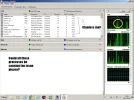
I opened the performance monitor but not sure what I was doing if I am honest

Screenshot 2015-11-10 13.18.21.webp

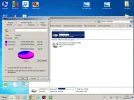
Untitled.webp

Does any one have a quick or temporary 'fix' for this please, It would be VERY grateful!!

Ps: I cannot afford a new PC/Laptop at the moment and throwing it out of the window is not an option as I love my 'spins' too much (and CM or course :p)

Many thanks in advance

Jon
 
Maybe something in power setting? Should be possible to never activate the fan.
In ancient times, I used to just stick a screwdriver in the stupid thing (But those were SUN workstations).
You could just disconnect it. And then if your computer gets really hot, reconnect. Usually doesn't happen.
 
Compaq == HP?

Unsure lol, thought that they were 2 diff companies??

I am incredibly thick sometimes for an intelligent chap, know how to plug em in and post a few screen shots but that's about it.

I cannot find the 'power settings' and have gone through the whole of 'Manage Computer' (right click) and Control panel.

I think I am just going to get one on HP and throw the bloody thing out, at least that way you lot won't have to suffer any more laggy winners videos :p

Edit: HP, poor choice of words, meant 'on the knock'
 
Hi, used to have a lot of fan problems myself, I feel for you.

A few simple questions for you:
  • this is a laptop or a tower? Easy to solve for a tower -- buy a good fan, they're much higher quality/quieter these days, cost you $20 or less -- but trickier on a laptop.
  • if it's a laptop have you had it cleaned in recent memory? Cooling in laptops is a delicate business and a little too much fuzz and fluff inside will send the cooling fans wild.
  • are pictures a possibility? Might be easy to spot and/or identify possible problems/solutions.
  • any chance you've looked at your BIOS settings? You can usually tweak or even fully control your fan profile. NP is you're not familiar with this stuff, kind of a tech-head thing I guess.
Sorry can't comment on your screenshots. I'm a Linux guy, the last Windo$ system I used was WinXP and that was years ago.
 
True enough, Windo$ is a pig. Always has been really, at least since Win98.
 
I'd say there are a lot of things about Windows that "just doesn't work" but then I'm bitter and biased. Spent too many years trying to maintain systems that were always half broken because of their dumb-ass software and the insistence on subverting pirates at the expense of legitimate users. Pushing shit uphill with a soggy rope, that's what life with Windows always seemed like to me.
 
Hi, used to have a lot of fan problems myself, I feel for you.

A few simple questions for you:
  • this is a laptop or a tower? Easy to solve for a tower -- buy a good fan, they're much higher quality/quieter these days, cost you $20 or less -- but trickier on a laptop.
  • if it's a laptop have you had it cleaned in recent memory? Cooling in laptops is a delicate business and a little too much fuzz and fluff inside will send the cooling fans wild.
  • are pictures a possibility? Might be easy to spot and/or identify possible problems/solutions.
  • any chance you've looked at your BIOS settings? You can usually tweak or even fully control your fan profile. NP is you're not familiar with this stuff, kind of a tech-head thing I guess.
Sorry can't comment on your screenshots. I'm a Linux guy, the last Windo$ system I used was WinXP and that was years ago.

Cheers Max

It is a tower so I may try the new fan option. I just about know what BIOS is unfortunately so won't risk messing about with that!

I vaguely recall the last 'tech' guy who had a look (similar thing happened on an older PC I had) doing some kind of audit/sweep of the processes, basically stating that so many of them that were running at the time were not needed and that I was basically 'killing my processor'

Will have a nosey around at fans on e-bay and maybe come across a refurbished PC!

Thank you all again who have contributed.
 
Windows has a habit of growing the 'Registry'. So it only gets slower. Reinstalling Windows always helps, since you start with an empty Registry.
I would recommend trying a USB Linux boot though (
You do not have permission to view link Log in or register now.
.
Can't hurt, and see how your fan behaves.
 
Actually as far as the fan thing goes eBay probably is not the friend you are looking for. If I was going to try to solve the problem this way I'd want to go for a high quality fan with top-notch specs. Ebay has too many fakes and frauds to make that my place of choice for such a purchase. I'd use a good computer supply place or a reputable dealer on Amazon.

That said if yours is simply a case of an old fan dying then pretty much anything will be an improvement, eBay might suffice.

If you want help solving the fan issue you could post some info about it. Is it the CPU cooler fan or a case fan? If case fan, what size?

However, if you system is simply bogged down with too much crap running then solving that problem will likely give you the biggest bang for your problem-solving hour. Win gets seriously choked up with crap over time and there's no substitute for a serious house-cleaning. Unfortunately that often means nothing short of an OS re-install which obviously has it's own pain associated with it.
 
I would use
You do not have permission to view link Log in or register now.
for all cpu bits, that way you know you are gettingthe better brands, there is plenty of other suppliers but ive never had issues with them for parts.

It didnt mention in your post whether it was the cpu fan or just a regular fan inside the case, so i just linked the fans section :D
 
I've never seen such a bad score. 2.9 :eek2: Mine is at 5.9 but only because of the HDD, the rest are at 7.9 or 7.4 - and my PC is 4.5 years old now (tweaked a little over the years, but nothing special).

Fans usually have a certain temperature-thresholds and when e.g. your CPU temperature is over that limit the fan will go higher RPM.

If everything is cleaned up I recommend to overclock your PC slightly either via BIOS or a fan-program like "Speed-Fan", a better fan-system can also solve the issue like max suggested. If you don't want too much hassle just overclock your PC and set the tresholds 10% higher (that shouldn't lead to any disaster). If this solves it - it's fine, if not you should consider a new PC, they are not that expensive nowadays.
 
I've never seen such a bad score. 2.9 :eek2: Mine is at 5.9 but only because of the HDD, the rest are at 7.9 or 7.4 - and my PC is 4.5 years old now (tweaked a little over the years, but nothing special).
He just has an awful graphics card :) Probably an on-board Intel. That's how HP rolls.
I've upgraded a lot of fans, but it usually doesn't make a lot of difference (sound wise).

Just re-install Windows, or try Linux.
 
PS. when I mentioned "cleaning" I meant real, physical cleaning of dust and fuzz, etc. It can make a huge difference, especially if your computer is in a dusty environment. One old computer of mine needed a thorough cleaning at least once a year. Not just for good measure but simply to keep the thing alive.

Got cats? They are fluff monsters and will generate all kinds of fuzz, etc that doesn't belong in your computer.

Unless your computer has good dust filters the chances are that if it is several years old it could use some TLC in this department.
 
I've upgraded a lot of fans, but it usually doesn't make a lot of difference (sound wise).

This must be a YMMV situation because I've had the reverse experience(s):
  • old computer, shitty old case fans, replacement was a god-send in terms of noise reduction.
  • current DIY computer, going for top quality Noctua fans VASTLY improved my fan noise problems. Same size fans, same speeds, huge drop in dB (50 down to 30-something). Well worth the $40 I dropped to upgrade the two front blowers.
 
I would use
You do not have permission to view link Log in or register now.
for all cpu bits, that way you know you are gettingthe better brands, there is plenty of other suppliers but ive never had issues with them for parts.

It didnt mention in your post whether it was the cpu fan or just a regular fan inside the case, so i just linked the fans section :D

Sorry, it is the CPU cooling fan, on and off like no tomorrow, its like its getting lsightly too hot, cooling with 3-4 seconds then rinse and repeat :(

Thanks for the input on this thread, really appreciated
 
This must be a YMMV situation because I've had the reverse experience(s):

Any sound is too much in my opinion.
The problem here is, that the CPU usage is just too high. I don't use Viper on Windows, because it tries to use 100% (even on a Dual). That'll start my fan. So I go with Linux. Same exact Viper software, but Linux uses decent pre-emptive stuff, so no problems there.
 
It's simply responding to the heat of the CPU.

Firstly do the ctrl-alt-del (which you have I think) to see how many processes are running. Eliminate unnecessary ones. Some games do put a high demand on the graphics card/processor - if you have any MG viper installed does the problem still occur?

You ventilation fan may be OK - I suspect you need new heat-transfer paste under your CPU fan. When this gets old it can reflect heat back to the CPU and becomes inefficient, leading fans to be on every time you perform the slightest task as the temperature triggers them as it should. It could be as simple as that.

Obviously check like Max said for any dead cats or family pets stuck in the grilles and fan blades too.
 
Cheers Dunover

Yes, there are no dead animals in the back and I got rid of all dust with nozzle of vacuum.

There are way too many processes running (best guess rather than knowledge) trouble is I don't know which ones I can get rid off/close or how to close them.

I do have several MG Vipers installed, 32 Red, Roxy Palace and one of the CR group casinos.

Whilst these are running the problem is a lot worse, fan is on for longer intervals and I cannot use Bandicam or have a browser open as PC runs way slower than it should.

You've seen the problems I have when I uploaded to winners videos and whilst I have Bandicam recording fan is at full pelt!

Trouble is although I studied computing at Uni my knowledge is totally and completely out of date so 'hands up' I am clueless and useless, hence this desperate plea thread.

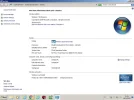
Copied in specs below just in case it may help you guys help me lol

Screenshot 2015-11-10 15.34.24.webp

Screenshot 2015-11-10 15.35.28.webp

On another note if anyone sells/knows of someone who sells a decent PC (cheapish) then please gimme a shout!

BR
Jon
 
Sorry, it is the CPU cooling fan, on and off like no tomorrow ...

If it were me I'd seriously consider the following, in decreasing preference:
  1. do what you need to do to reduce the load on the CPU. Typically that means reducing the number of process that run and are eating CPU cycles. If you know your business then by all means, dig into your system and kill anything that is not essential and worthwhile. Not an easy task. The brute force way is to delete your partition -- thereby deleting your entire installation, data, apps, settings and all -- and start from scratch. Radical medicine but I assure you that if you can handle the pain of it the gain is (almost always) worth it. This will only cost you your time, assuming you know what you are doing or take the time to learn. If you just jump in and start blindly chopping away at your system you're likely to end up doing the full re-install whether you like it or not.
    .
  2. get someone to do a tear-down and re-install of your whole CPU unit. That means pull apart, totally clean, reinstall, new paste on the CPU/cooler interface, etc. You want it to look like new. Chances are it'll perform a lot better. $50 to get someone to do it for you, or buy a few cleaning tools and do it yourself.
    .
  3. consider a new, more efficient CPU cooler. Chances are you're running a stock cooler, the one that came with the CPU. They are only average, noisy performers. You can do A LOT better with a quality, after-market cooler (assuming your CPU isn't ancient and simply not up to the task(s) you're asking it to perform). Guesstimate 35-70 (local currency).
    .
  4. consider a whole new CPU unit and cooler. Might be just the thing if the rest of your system is satisfactory for now. Might also be a matter of putting new shoes on an old horse, minimal gains for the effort involved. Could cost anything from 50 to whatever you want to pay, but your motherboard will probably limit your choices.
    .
  5. look at getting a whole new system. If your needs are modest your cash outlay can also be modest, computer gear has gotten MUCH cheaper for every-day average usage. If you want a kick-ass system you are going to have to open your wallet fairly wide. It's very tough to get "kick ass" for much less than 1000 of whatever your local currency is. "Modest" can usually be had for about half that. Low-end for roughly 1/2 of "Modest". Know thyself.

If you are considering a new, not-kick-ass system let me know via PM. I'm going through that very exercise myself these days and might be able to save you a lot of time and effort looking for options.

A few words about after-market replacement/upgrade fans. Fans are finally considered a serious and important part of a healthy computer system and fan tech has progressed hugely in the last few years. Cheap, stock fans can't hold a candle to high-end performance fans which run cooler, slower, quieter and much more efficiently than the old $5 blowers that computers used to come with. I'm slightly embarrassed to say that I have a fair amount of experience in this particular area: stupid mistakes, false economy and unrealistic expectations = great learning opportunities.

A top quality case fan will cost 20-30 $/£/€ but it can make a world of difference in how you feel using your box. As long as you are not sitting check-by-jowl with your computer the noise drop -- roughly 10-25 dB -- that good fans give you can be a life saver. For the most part this applies as much to CPU fans as it does to case fans. The box you have and the gear in it will determine how far you can take this but in general fan upgrades can be a cheap way to tame the beast and make happy quietness a possibility.

Of course this all assumes the rest of your system is up to the task at hand. If you haven't got sufficient CPU, GPU, RAM or storage then a new fan is not going to solve your problems.
 
Right, I can see the problem you mention now. 3GB of RAM is on the low side. I am spoilt as I have said before due to having a 16GB RAM and SSD drive which runs quicker than Hard Drive anyway. I have checked and when using Bandicam plus a Viper client or HD flash game I am eating the RAM up higher than the 3GB you have. This explains the 'queueing' you have especially when videoing. I can open 4 MG Vipers at once and play the tournies at the same time and record with no lag. I have a desktop with 4GB RAM and Win7 Home so similar spec to you and tried your processes. Laggy as hell. Your processor 2.8ghz should be OK though.

So I guess you need a better spec machine. I love this one, you can get similar SSD laptops (I'd never go back to HD now!) with 8-16 GB RAM 4ghz CPU and gaming graphics card now for 7-800 quid. I know that's steep but 10 secs from boot to being on the web and no lagging etc. makes it a good investment.

If not try for at least 3.1ghz and 8GB RAM on a HD.:thumbsup:
 
Special shout to Max and Dunover for their detailed and informative responses above. I really appreciate your guys time and input.

As mentioned when it comes to the tech side I am not too clued up so those latest posts are extremely helpful (not saying the other are not btw :p)

I am going to consider my options but it looks like I may head towards a new system although not 100% made up my mind yet.

I do work from home but that is basic word/excel stuff so the main 'need for performance' is literally just for my enjoyment (casinos flash and viper) and the ability to have a couple of apps running at once.

Unfortunately work is mediocre at the moment so £700-£800, although worthwhile is well out of my price range.

Thank you again one and all :D
 
FYI you can get a modest little box -- likely to handle the needs you've mentioned -- in the £300-400 range, roughly speaking. I've been looking at exactly that kind of system for my wife's 2nd computer.
 

Users who are viewing this thread

Accredited Casinos

Read about our rating system and how it's done.
Back
Top