




- Joined
- Jan 20, 2004
- Location
- Pictland
[maxd says: please go here which replaces the outdated material below.]
Every once in a while you want to tweak your public profile here on the forums so I thought I'd bang together a quick how-to on that. It's pretty simple, three easy steps:
That should do it. Feel free to add comments to this if I've missed anything.
Every once in a while you want to tweak your public profile here on the forums so I thought I'd bang together a quick how-to on that. It's pretty simple, three easy steps:
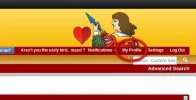
- Go to any forum page, the upper right corner will look like this. You want to click on "My Profile".
.
.
. - Once you're into your Profile you'll see this tab bar (or some version thereof), click on "About Me".
.

.
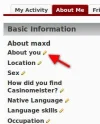
. - The "About Me" tab should now be highlighted and you'll see all the individual entries for your personal data and info. Beside each is a little pencil icon, click that and you're into an edit box for that entry.
.
.
.
That should do it. Feel free to add comments to this if I've missed anything.
Last edited:


