external image

Feedback Picture File Limit?

In addition to the limit mentioned above see Link Outdated / Removed for some further details related to your membership status. In particular note the "Picture Uploading Permissions" section.
 
Can you upload to a freebie storage site and just put links to the images instead of uploading them here?
 
Do you not get any free webspace from your ISP?

I get 100MB of storage for free as part of my internet package, I just upload my screenshots to there via FTP and link to them in my posts here at CM.
 
How do you guys post all these screenshots?? I have a total storage limit of 700kb on Casinomeister :-(((

That is not right, perhaps the file size is to big try resizing it. I do not see were anyone has a limit on how many attachments one can upload in the user groups.

If you want to see what attachments you currently have and want to delete any see Link Outdated / Removed

If that does not work for you then I suggest you try Tinypic, no need to sign up or anything
You do not have permission to view link Log in or register now.


Cheers
Matt
 
That is not right, perhaps the file size is to big try resizing it. I do not see were anyone has a limit on how many attachments one can upload in the user groups.

I agree. I have never seen any limit on how many attachments one can upload (or how much space one can use) within the different user groups. I checked "my" attachments:

You are currently using 24.97 MB to store 434 uploaded attachments.

It would be a bit strange if members had to start deleting images from old threads when they had reached max number/seize of attachments :)
 
I agree. I have never seen any limit on how many attachments one can upload (or how much space one can use) within the different user groups. I checked "my" attachments:

You are currently using 24.97 MB to store 434 uploaded attachments.

It would be a bit strange if members had to start deleting images from old threads when they had reached max number/seize of attachments :)

I was definitely having that issue when I was a new member, my total storage limit was something tiny like 1MB.

That's partly why I started using my own webspace and simply linking to the screenshots there.
 
I agree. I have never seen any limit on how many attachments one can upload (or how much space one can use) within the different user groups. I checked "my" attachments:

You are currently using 24.97 MB to store 434 uploaded attachments.

It would be a bit strange if members had to start deleting images from old threads when they had reached max number/seize of attachments :)

I am seeing this already. Many older threads have "broken images", and often much of the story is in the picture. It seems most are down to the use of external image hosting, where any changes there break the link. This also happens when users no longer retain their accounts at an image storage site, and their content gets deleted.

The advantage of uploading direct to CM is that the images should remain for as long as there is a thread using it. If users have to start deleting old images, they will be causing "damage" to old archive threads, and possibly newer ones.

I find the image management interface very hard to navigate, and pretty slow to respond too. I can only see a fraction of my total number of images, and many don't even have a thumbnail for me to quickly see what it is. Rather than slowly working my way through 50+ pages, I will upload a new copy of an image from my own local storage rather than spend ages trying to find it in the CM app.

What is needed is a better image management app so that it is easy to look through past images, find where they have been used, and to be able to do so with the minimum of browser actions. A "never been used" list would be useful, as such images do not need to be stored on CM, and deleting them would be a quick way to release space.
 
Thanks guys, i was wrong, the limit is 800 kb :)

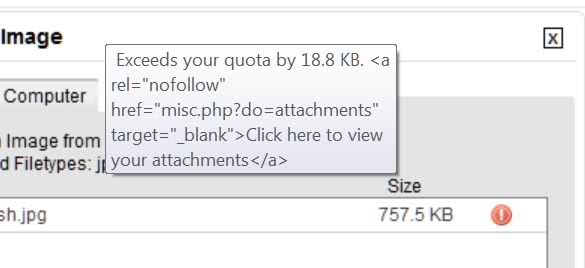
I see it when i want to upload a new picture that would, i get then the "over quota" message.

2ai1qvs.jpg


2wox2yp.jpg
 
Thanks guys, i was wrong, the limit is 800 kb :)

I see it when i want to upload a new picture that would, i get then the "over quota" message.

2ai1qvs.jpg


2wox2yp.jpg

Any idea when i get more than 800kb? Otherwise i'll just use tinypic. But i'm not a fan of these ways of uploading, because when tinypic dies or fuck up their database, all my screenshots will be gone...
 
Any idea when i get more than 800kb? Otherwise i'll just use tinypic. But i'm not a fan of these ways of uploading, because when tinypic dies or fuck up their database, all my screenshots will be gone...

It's here in the FAQ:
https://www.casinomeister.com/forums/help/forum-rules/

This lists the membership levels in the forum. Once you become "Fully Registered" you'll have unlimited upload capability.

Fully Registered: Once a member has either 50 reputation points or 50 posts and has been registered for at least 90 days, the membership becomes "Fully Registered". These members have full usage of the public areas, and are able to create personal albums, join social groups, join the "Webmeister" user group, and blog.

The complete list of permissions is found here:
Link Outdated / Removed
 

Users who are viewing this thread

Accredited Casinos

Read about our rating system and how it's done.
Back
Top