external image

Anyone else....

PNEFOREVER2

Dormant account
Joined
Jun 3, 2011
Location
Preston,lancs
...Having problems with 32Red?

I can log in but nothing appears, really starting to get fed up with this software barely a week goes by where I don't have some sort of issue with it, it was also like this yesterday but I just gave up trying to sort it.

Checked I have the correct flash update, tried re-installing it, that doesn't work. Any ideas anyone?

EDIT: just tried Golden Lounge too and that's the same so I'm guessing it's something to do with my laptop.
32RED.webp
 
I'm now back at square 1 after re-installing Kaspersky.

I recently renewed the license so it must be something to do with this, had this anti-virus on for the past year and it's been fine.

Seriously bugging me.
 
There may be a new virus definition update for Kaspersky, which are blocking the 32red.exe casino software by "mistake".

Have you tried to add 32red.exe as an exception in the antivirus software?

Checked on the app/website reputation and it lists 32Red as good.

I think it may be because when I renewed the license key, it seemed to also download another version of Kaspersky, whilst still having the 2013 version on. Now I would uninstall the 2013 version, but the problem is I had an Windows update a while back which made most of my installed programs disappear from the control panel, so now I can't uninstall them.

I hate technology.
 
I don't use Kaspersky myself, but when I'm having trouble with online casinos the first step I usually try is running ccleaner and then deleting all the stored flash info so I can start with a blank slate - delete flash cookies/cache here:
You do not have permission to view link Log in or register now.


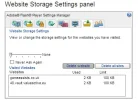
Scroll through there, you'll be surprised at the junk you have. Anyhow, you can probably delete everything under that tab so it's empty. Then try 32red and see if it will load. If it doesn't, go back to the Flash page and refresh it and you should have a couple of new items, I just did it and it shows up like this:

flash2.webp

EDIT: Attached the wrong screenie, sorry. Now it's right.

Are you showing new items?

If that doesn't help, the next step would be to see if it's the casino or the A/V, so if you could check whether it's blocking any other MG casinos that aren't part of 32red group?

EDIT #TWO! Did you know that kaspersky has an uninstall tool? Most A/V programs do, it's a security thing. So if you wanted to uninstall and reinstall it you can get the removal tool here:
You do not have permission to view link Log in or register now.
 
Last edited:
I don't use Kaspersky myself, but when I'm having trouble with online casinos the first step I usually try is running ccleaner and then deleting all the stored flash info so I can start with a blank slate - delete flash cookies/cache here:
You do not have permission to view link Log in or register now.


Scroll through there, you'll be surprised at the junk you have. Anyhow, you can probably delete everything under that tab so it's empty. Then try 32red and see if it will load. If it doesn't, go back to the Flash page and refresh it and you should have a couple of new items, I just did it and it shows up like this:

View attachment 47707

EDIT: Attached the wrong screenie, sorry. Now it's right.

Are you showing new items?

If that doesn't help, the next step would be to see if it's the casino or the A/V, so if you could check whether it's blocking any other MG casinos that aren't part of 32red group?

EDIT #TWO! Did you know that kaspersky has an uninstall tool? Most A/V programs do, it's a security thing. So if you wanted to uninstall and reinstall it you can get the removal tool here:
You do not have permission to view link Log in or register now.

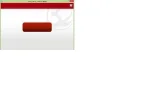
Was unable to try with 32Red as I can't even get it to startup. I did try with Dash and nothing appeared. We got the old Kaspersky off and put the 2014 one on yet the problem persists. Have also tried reinstalling which doesn't work - where it usually says 'install' on the red button - nothing appears:

Installation.webp

Have also tried checking we have the correct java update too.
 
Sorted, restored it to an earlier point (again), then managed to reinstall the casino by using the install.exe file.

Then used the AV remover Chayton suggested, then reinstalled, now all appears fine. Not sure what was wrong.

Thanks Chayton.
 
At least now you'll know what works in case it happens again after another update! I use Avast and sometimes after an update I lose all my internet access, it's like something in the update just ends up blocking everything. It's annoying but I'm so used to it now that I just keep a copy of the Avast uninstall utility on my desktop for convenience.

BTW if you're having trouble accessing your add/remove programs to uninstall any other programs, you can try uninstalling using CCleaner instead.

Anyhow glad you got it working! :thumbsup:
 

Users who are viewing this thread

Accredited Casinos

Read about our rating system and how it's done.
Back
Top