Online Casinos - Casinomeister Logo Online Casinos - Casinomeister
Page 1 of 2 12 LastLast
Results 1 to 10 of 17

Thread: "How To" Screenshots: fire away!

  1. #1
    maxd's Avatar
    maxd is offline PAB guy at Casinomeister Achievements:
    VeteranCreated Album picturesCreated Blog entryTagMeister50000 Experience Points
    Join Date
    Jan 2004
    Location
    Eurozone
    Posts
    5,938
    Blog Entries
    38
    Thanks
    1,574
    Thanked 4,246 Times in 1,772 Posts
    Rep Power
    15
    Reputation Points: 22751

    "How To" Screenshots: fire away!

    Hi everyone,

    I'm working on a new section for the FAQ wherein I want to detail the wonderful world of screenshots.
    • What applications should one use for screenshots, or not?
    • What caveats and gotchas should players know?
    • Any tricks and tips from the Casinomeister faithful?

    So post your "takings screenshots" suggestions here, or questions if you've got 'em.

    I expect this will evolve over time so I'll update the questions and answers as need be.

    FWIW, I will incorporate Simmo's info posted here: How To Create A Screenshot.
    Last edited by maxd; 6th November 2008 at 02:42 PM.
    Useful links: Accredited Casinos & Poker Rooms ~ Casino Reps ~ Warnings ~ Rogue Pit ~ "No Can Do" ~ Forum Rules
    NEW! CM's Annual Awards: Best and Worst in Online Gambling for 2011
    Pitch-A-Bitch Stuff: read the PAB FAQ, Submit a PAB (don't forget to read the FAQ!), or dig around in the PAB Archives.
    Other stuff: Max's Blog (ICE reports, editorials, et al).
    Feeling generous? ... Max's Wish List at Amazon!

  2. #2
    maxd's Avatar
    maxd is offline PAB guy at Casinomeister Achievements:
    VeteranCreated Album picturesCreated Blog entryTagMeister50000 Experience Points
    Join Date
    Jan 2004
    Location
    Eurozone
    Posts
    5,938
    Blog Entries
    38
    Thanks
    1,574
    Thanked 4,246 Times in 1,772 Posts
    Rep Power
    15
    Reputation Points: 22751
    Let me chip in with a few of my experiences:

    • some casino packages seem to hijack the PrintScreen button (under Windows) so you can't always count on that technique.
    • a good screen-grab application can be invaluable: I've used SnagIt for years now and swear by it. Not free though, need to buy a license for it ($$).
    • if you're into freebie apps PicPick is good, though it is not as full-featured as something like SnagIt (nor as bloated!).
    Useful links: Accredited Casinos & Poker Rooms ~ Casino Reps ~ Warnings ~ Rogue Pit ~ "No Can Do" ~ Forum Rules
    NEW! CM's Annual Awards: Best and Worst in Online Gambling for 2011
    Pitch-A-Bitch Stuff: read the PAB FAQ, Submit a PAB (don't forget to read the FAQ!), or dig around in the PAB Archives.
    Other stuff: Max's Blog (ICE reports, editorials, et al).
    Feeling generous? ... Max's Wish List at Amazon!

  3. #3
    brianzz's Avatar
    brianzz is offline All Around Douchebag
    Join Date
    Feb 2006
    Location
    TN
    Posts
    694
    Thanks
    155
    Thanked 416 Times in 202 Posts
    Rep Power
    39
    Reputation Points: 2339
    I use snagit for vids and screen caps, the best part is you can set it up to screen cap and auto name and auto save so you don't even have to bother with going and pasting and saving and naming yourself. You don't necessarily have to buy it per say, just look around, it can be had. Very good program tho'.

  4. #4
    WonderingSpirit's Avatar
    WonderingSpirit is offline Senior Member
    Join Date
    Nov 2008
    Location
    Scandinavia
    Posts
    210
    Thanks
    114
    Thanked 97 Times in 55 Posts
    Rep Power
    18
    Reputation Points: 601
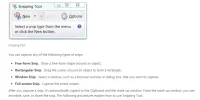
    Windows vista has a built in snip tool. Thats the easiest way to take screenshots as you have full control of which areas you want to take screenshots of. There is also a marker to highlight part of the screenshot.
    http://windowshelp.microsoft.com/Win...605b41033.mspx

    You can choose rectangular screenshots or freeform like this
    Attached Images Attached Images
    Last edited by WonderingSpirit; 11th March 2009 at 10:00 PM. Reason: put in a microsoft link

  5. #5
    bb28's Avatar
    bb28 is offline Meister Member Achievements:
    Your first GroupVeteranCreated Album pictures25000 Experience PointsOverdrive
    Join Date
    Nov 2006
    Location
    US
    Posts
    1,308
    Thanks
    2,448
    Thanked 1,640 Times in 749 Posts
    Rep Power
    71
    Reputation Points: 8601
    Gadwin's Print Screen is a good freebie.

  6. #6
    love2winalot's Avatar
    love2winalot is offline Playing to Win, not lose.
    Join Date
    Feb 2009
    Location
    Philippines/Visiting Las vegas
    Posts
    812
    Thanks
    540
    Thanked 434 Times in 267 Posts
    Rep Power
    31
    Reputation Points: 2816
    Hiya. Also, a lot of people do not know how to get their screen shot to appear on message boards. I use Photobucket. You go to their site, and the set up is free. They host all your pictures there for free.

    At photobucket, you hit upload, and browz, to get the picture off your pc you want to upload. It takes about 5-10 seconds to do. Then, move your cusor over the picture, and boxes appear underneath it. Right click on, "link" and copy. Now come here, and click, "paste" and Weeeeeee.

  7. #7
    catrina m's Avatar
    catrina m is offline Senior Member Achievements:
    Friends R Us1 year registered5000 Experience PointsSocial Magnet!
    Join Date
    Feb 2007
    Location
    US of A
    Posts
    853
    Thanks
    599
    Thanked 654 Times in 284 Posts
    Rep Power
    41
    Reputation Points: 3394
    I have mentioned this before but Gadwin printscreen is free and a small download.

    Works perfect everytime.


    http://www.gadwin.com/printscreen/
    Catrina

  8. #8
    BLUEWATER is offline Full Member
    Join Date
    Jan 2006
    Location
    NoWhere
    Posts
    97
    Thanks
    17
    Thanked 16 Times in 12 Posts
    Rep Power
    25
    Reputation Points: 90
    I already know how to do the screen shot. How do I do I post in the forum? Can you please give me advice? I have one ready to post the paint from my desktop.

    Thanks

  9. #9
    KasinoKing's Avatar
    KasinoKing is offline WebMeister & Slotaholic..
    Achievements:
    VeteranCreated Album picturesCreated Blog entry50000 Experience PointsSocial Magnet!
    Join Date
    Aug 2004
    Location
    Hastings, UK
    Posts
    8,428
    Blog Entries
    7
    Thanks
    4,880
    Thanked 4,979 Times in 2,467 Posts
    Rep Power
    207
    Reputation Points: 26974
    Quote Originally Posted by BLUEWATER View Post
    I already know how to do the screen shot. How do I do I post in the forum? Can you please give me advice? I have one ready to post the paint from my desktop.

    Thanks
    When you post, look below the typing area for a button marked "Manage Attachments".
    Click on that & then it is all pretty clear.
    You need to make sure your picture is the right size first or strange things can happen!
    I have a guide here.

    I hope it's a good one!
    KK
    Snow's over - back to work - nothing to see here...
    KasinoKing's News < Kasino King gets a makeover... !
    180+ Recommended Casinos ~ Reel Layouts and Jackpot Odds ~ USA Friendly Casinos

  10. #10
    maxd's Avatar
    maxd is offline PAB guy at Casinomeister Achievements:
    VeteranCreated Album picturesCreated Blog entryTagMeister50000 Experience Points
    Join Date
    Jan 2004
    Location
    Eurozone
    Posts
    5,938
    Blog Entries
    38
    Thanks
    1,574
    Thanked 4,246 Times in 1,772 Posts
    Rep Power
    15
    Reputation Points: 22751
    KK's thing sounds good. Here's a "once over lightly" guide through the posting process:

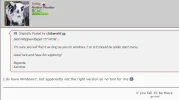
    Start like you would for any other post, scroll down until you see the "Manage Attachments" button:


    This will open up the 'Manage Attachments" pop-up:


    Repeat steps 1: and 2: for each attachment you want to display (note that there are file dimension and size limits). When you're done click on "Close this window" (step 3).
    Useful links: Accredited Casinos & Poker Rooms ~ Casino Reps ~ Warnings ~ Rogue Pit ~ "No Can Do" ~ Forum Rules
    NEW! CM's Annual Awards: Best and Worst in Online Gambling for 2011
    Pitch-A-Bitch Stuff: read the PAB FAQ, Submit a PAB (don't forget to read the FAQ!), or dig around in the PAB Archives.
    Other stuff: Max's Blog (ICE reports, editorials, et al).
    Feeling generous? ... Max's Wish List at Amazon!

Page 1 of 2 12 LastLast

Similar Threads

  1. A Year In Review of The "WINNER SCREENSHOTS" thread.
    By johnsteed in forum Online Casinos
    Replies: 57
    Last Post: 14th August 2011, 10:37 PM
  2. Replies: 6
    Last Post: 13th April 2007, 08:42 PM
  3. Replies: 31
    Last Post: 24th January 2007, 05:24 AM
  4. From "Internet Wanderer" to "OGGS", who is "SIMMO!"?
    By johnsteed in forum Online Casinos
    Replies: 21
    Last Post: 20th July 2006, 09:16 AM
  5. Question about "winners screenshots"
    By just play in forum Online Casinos
    Replies: 11
    Last Post: 4th June 2006, 11:09 AM

Tags for this Thread

Bookmarks

Posting Permissions

  • You may not post new threads
  • You may not post replies
  • You may not post attachments
  • You may not edit your posts
  •  

Legal Statements and Privacy Policy
Casinomeister.com does not intend for any of the information contained on this website to be used for illegal purposes. You must ensure you meet all age and other regulatory requirements before entering a casino or placing a wager. Online gambling is illegal in many jurisdictions and users should consult legal counsel regarding the legal status of online gambling and gaming in their jurisdictions. The information in this site is for news and entertainment purposes only. Casinomeister.com is an independent directory and information service free of any gaming operator's control. Links to third party websites on Casinomeister.com are provided solely for informative/educational purposes. If you use these links, you leave this Website.