Somewhat related to the original topic:
"Best Free Screen Capture Utility" round-up (here) at Gizmo's Freeware.
![]() |
![]() |
Somewhat related to the original topic:
"Best Free Screen Capture Utility" round-up (here) at Gizmo's Freeware.
Useful links: Accredited Casinos & Poker Rooms ~ Casino Reps ~ Warnings ~ Rogue Pit ~ "No Can Do" ~ Forum Rules
NEW! CM's Annual Awards: Best and Worst in Online Gambling for 2011
Pitch-A-Bitch Stuff: read the PAB FAQ, Submit a PAB (don't forget to read the FAQ!), or dig around in the PAB Archives.
Other stuff: Max's Blog (ICE reports, editorials, et al). Feeling generous? ... Max's Wish List at Amazon!
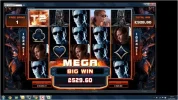
Here goes nothing.....[Felicie adds: just following the instructions so I could do a screen shot]
Last edited by felicie; 12th February 2011 at 11:21 PM.
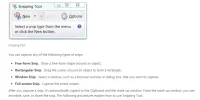
The crop tool should be mentioned.
Another thing worth mentioning - if you just hit Print Screen you print your entire screen, including your destop and other windows that may be active at the same time.
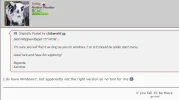
If you hold down the ALT key and then hit the Print Screen, it only captures the top 'active' window. So if you're playing at a casino and ALT+PrintScreen you get only the casino - if you're playing at a casino and get an error message window and use ALT+PrintScreen you get just the error message.
![]()
"I feel sullied and unusual" - Captain Jack Sparrow
incrediblestuff (7th December 2011)
I´m having trouble managing attachments due to lack of space (so it seems anyway). I have checked my profile and deleted old attachments from there and when I go into "Manage attachments" it says "0 of 97,7KB used". That´s too small to attach even one JPEG-file. I can see some of my old attachments lined up in this area but when I select them all there are no "Delete"-button. What can I do?
I am having the same problem. Can't free up space to post new screen shots. The old ones can't be deleted from the drag and drop menu in the attachment manager. Any help would be greatly appreciated.
Bookmarks