Online Casinos - Casinomeister Logo Online Casinos - Casinomeister
Results 1 to 8 of 8

Thread: CDS Help

  1. #1
    brucake is offline Banned User - player fraud - flaming troll
    Join Date
    Mar 2011
    Location
    Kintston-upon-Thames
    Posts
    11
    Thanks
    1
    Thanked 2 Times in 2 Posts
    Rep Power
    0
    Reputation Points: 20

    CDS Help

    I was trying to file a complaint to CDS about friends casino. The friends casino site does not have a working CDS link. There is a CDS sign but it isn't a working link. When I go to CDS it only offers 3 casinos. How do you find the right place so that I can file a complaint?
    Also, is this a worthwhile casino to PaB? It is not listed on the accredited list here.

  2. #2
    vinylweatherman's Avatar
    vinylweatherman is offline Typus Infinitus Achievements:
    Veteran50000 Experience PointsOverdrivePeople Likes You
    Awards:
    Frequent PosterCommunity AwardMost Popular
    Join Date
    Oct 2004
    Location
    United Kingdom
    Posts
    10,795
    Thanks
    414
    Thanked 6,844 Times in 3,671 Posts
    Rep Power
    271
    Reputation Points: 37443
    Quote Originally Posted by brucake View Post
    I was trying to file a complaint to CDS about friends casino. The friends casino site does not have a working CDS link. There is a CDS sign but it isn't a working link. When I go to CDS it only offers 3 casinos. How do you find the right place so that I can file a complaint?
    Also, is this a worthwhile casino to PaB? It is not listed on the accredited list here.
    They are most likely rogue, as you are ONLY meant to submit a CDS complaint through the link on the casino site, so they have made sure you CAN'T submit a CDS complaint. In other words, they won't even let you complain to the mailman, let alone a licensing authority.

    They wouldn't also happen to be "legally licensed and insured", and based somewhere like Costa Rica or Panama?
    Empty Fruities Astern Capt'n
    Back to port for unloading.
    Full Sails - before we get raided ourselves.

  3. #3
    alfred666's Avatar
    alfred666 is offline Experienced Member
    Join Date
    Mar 2004
    Location
    online
    Posts
    66
    Thanks
    14
    Thanked 38 Times in 25 Posts
    Rep Power
    35
    Reputation Points: 200
    I know nothing about friends casino, but was looking around their site and discovered something interesting I thought might be worth sharing.

    One of their partners (for credit card processing) is running a VERY shady business:

    The following site is directly connected to their processor:
    www . printer4u . biz
    (I deliberately put SPACES in between above. Proceed to this URL at your OWN RISK!!)

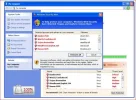
    This site takes you to a Fake Malware Scanner, which is designed to trick webusers into paying for an anti-virus scanner to get rid of a virus which doesn't even exist (at least not, before the user browsed their site...)

    this is what you'll get:
    Capture.jpg

    I know this doesn't answer the OP's question, but should help others to make their conclusion on this outfit.

  4. The Following User Says Thank You to alfred666 For This Useful Post:

    Jasminebed (9th May 2011)

  5. #4
    kombucha's Avatar
    kombucha is offline Full Member
    Join Date
    Aug 2010
    Location
    nethherlands
    Posts
    64
    Thanks
    10
    Thanked 20 Times in 11 Posts
    Rep Power
    8
    Reputation Points: 110
    your root kit is fucked :s
    try to get as much info and then reinstall your OS .. your cached memory ( prob 8k,16 or 32k ) space as well.
    after that i would re-config my router ( call your ISP, better safe then.. )

    Ubuntu 10.10... is bootable from your cd drive. ( it's a linux OS, but very simple )
    If you have time, give it try before you format.. you could prob save some stuff and TRACE that shit

  6. #5
    vinylweatherman's Avatar
    vinylweatherman is offline Typus Infinitus Achievements:
    Veteran50000 Experience PointsOverdrivePeople Likes You
    Awards:
    Frequent PosterCommunity AwardMost Popular
    Join Date
    Oct 2004
    Location
    United Kingdom
    Posts
    10,795
    Thanks
    414
    Thanked 6,844 Times in 3,671 Posts
    Rep Power
    271
    Reputation Points: 37443
    Quote Originally Posted by kombucha View Post
    your root kit is fucked :s
    try to get as much info and then reinstall your OS .. your cached memory ( prob 8k,16 or 32k ) space as well.
    after that i would re-config my router ( call your ISP, better safe then.. )

    Ubuntu 10.10... is bootable from your cd drive. ( it's a linux OS, but very simple )
    If you have time, give it try before you format.. you could prob save some stuff and TRACE that shit
    It may not be that bad. The point of these fake scanners is blackmail. The user will be asked to "upgrade" to a paid version in order to have the threats removed. In the mean time, a package would have been left behind that constantly reminds the user of these uncleared threats every time they use their PC.

    A friend of mine got one of these, and I was able to identify and remove it using some online research and an appropriate tool from a well respected vendor.

    The step by step removal guide is not for the faint hearted though, and some steps are not needed depending upon the exact variant installed.

    One trick is that some files are held by an active process, and cannot simply be deleted. This has to be done either by adding script to "autoexec.bat" (which the tools can do for you), or booting from a CD or rescue disk. These then allow removal of the files at boot up.

    If a rootkit has been sneaked in, this can be detected by the newer security packages, and removed.

    One sign of a rootkit, or something else, remaining is that the scanner will find it's way back onto the PC after a couple more reboots.

    At the very least, there is an opportunity to rescue your data before reinstalling the OS. The rescued data should then be subjected to a deep scan by a good security product before being allowed back onto the clean install.

    Good security in the first place would normally prevent this scanner from installing it's package, but it might still try it on by showing a webpage that looked like a warning from your OS.
    Security packages have a list of known websites like this, and create a blacklist in the registry which prevents these known sites putting ANYTHING on your PC, as well as giving a clear warning before allowing the browser to load the pages.

    Empty Fruities Astern Capt'n
    Back to port for unloading.
    Full Sails - before we get raided ourselves.

  7. #6
    kombucha's Avatar
    kombucha is offline Full Member
    Join Date
    Aug 2010
    Location
    nethherlands
    Posts
    64
    Thanks
    10
    Thanked 20 Times in 11 Posts
    Rep Power
    8
    Reputation Points: 110
    Quote Originally Posted by vinylweatherman View Post
    It may not be that bad. The point of these fake scanners is blackmail. The user will be asked to "upgrade" to a paid version in order to have the threats removed. In the mean time, a package would have been left behind that constantly reminds the user of these uncleared threats every time they use their PC.

    A friend of mine got one of these, and I was able to identify and remove it using some online research and an appropriate tool from a well respected vendor.

    The step by step removal guide is not for the faint hearted though, and some steps are not needed depending upon the exact variant installed.

    One trick is that some files are held by an active process, and cannot simply be deleted. This has to be done either by adding script to "autoexec.bat" (which the tools can do for you), or booting from a CD or rescue disk. These then allow removal of the files at boot up.

    If a rootkit has been sneaked in, this can be detected by the newer security packages, and removed.

    One sign of a rootkit, or something else, remaining is that the scanner will find it's way back onto the PC after a couple more reboots.

    At the very least, there is an opportunity to rescue your data before reinstalling the OS. The rescued data should then be subjected to a deep scan by a good security product before being allowed back onto the clean install.

    Good security in the first place would normally prevent this scanner from installing it's package, but it might still try it on by showing a webpage that looked like a warning from your OS.
    Security packages have a list of known websites like this, and create a blacklist in the registry which prevents these known sites putting ANYTHING on your PC, as well as giving a clear warning before allowing the browser to load the pages.


    ok it's just that experiences in the past made me a bit paranoid
    he has a good point try that first


    ... altough if he can: dual booting with something like ubuntu is not that drastic, to save your files..
    i don't think he has a legal ***** cd , cause the new genuine firewall would have fixed it, what do you think?

  8. #7
    alfred666's Avatar
    alfred666 is offline Experienced Member
    Join Date
    Mar 2004
    Location
    online
    Posts
    66
    Thanks
    14
    Thanked 38 Times in 25 Posts
    Rep Power
    35
    Reputation Points: 200
    Thanks for the feedback and suggestions guys.

    My machine is actually fine and not infected with any unwanted software at all. Sorry, my original post wasn't that clear on this.

    The screenshot I posted is actually just the webpage served when browsing the mentioned URL.
    This webpage just looks like a standard windows control and security alert trying to trick the unexperienced user to click "Remove all" or "Start protection" (which I didn't), which in turn then will install the fake malware scanner.

    They have put a lot of effort into making this site appear like a real threat. Unfortunately these guys are wasting their creative energy on the dark side..

  9. #8
    vinylweatherman's Avatar
    vinylweatherman is offline Typus Infinitus Achievements:
    Veteran50000 Experience PointsOverdrivePeople Likes You
    Awards:
    Frequent PosterCommunity AwardMost Popular
    Join Date
    Oct 2004
    Location
    United Kingdom
    Posts
    10,795
    Thanks
    414
    Thanked 6,844 Times in 3,671 Posts
    Rep Power
    271
    Reputation Points: 37443
    Quote Originally Posted by alfred666 View Post
    Thanks for the feedback and suggestions guys.

    My machine is actually fine and not infected with any unwanted software at all. Sorry, my original post wasn't that clear on this.

    The screenshot I posted is actually just the webpage served when browsing the mentioned URL.
    This webpage just looks like a standard windows control and security alert trying to trick the unexperienced user to click "Remove all" or "Start protection" (which I didn't), which in turn then will install the fake malware scanner.

    They have put a lot of effort into making this site appear like a real threat. Unfortunately these guys are wasting their creative energy on the dark side..
    Just as well. This is how my friend got caught, clicked "Start Protection" and THEN found out a bit later that something nasty had gotten onto the machine, and kept on mimicking a standard Windows system tray alert, which when clicked went to a site asking for payment to remove the threats.
    Empty Fruities Astern Capt'n
    Back to port for unloading.
    Full Sails - before we get raided ourselves.

Tags for this Thread

Bookmarks

Posting Permissions

  • You may not post new threads
  • You may not post replies
  • You may not post attachments
  • You may not edit your posts
  •  

Legal Statements and Privacy Policy
Casinomeister.com does not intend for any of the information contained on this website to be used for illegal purposes. You must ensure you meet all age and other regulatory requirements before entering a casino or placing a wager. Online gambling is illegal in many jurisdictions and users should consult legal counsel regarding the legal status of online gambling and gaming in their jurisdictions. The information in this site is for news and entertainment purposes only. Casinomeister.com is an independent directory and information service free of any gaming operator's control. Links to third party websites on Casinomeister.com are provided solely for informative/educational purposes. If you use these links, you leave this Website.